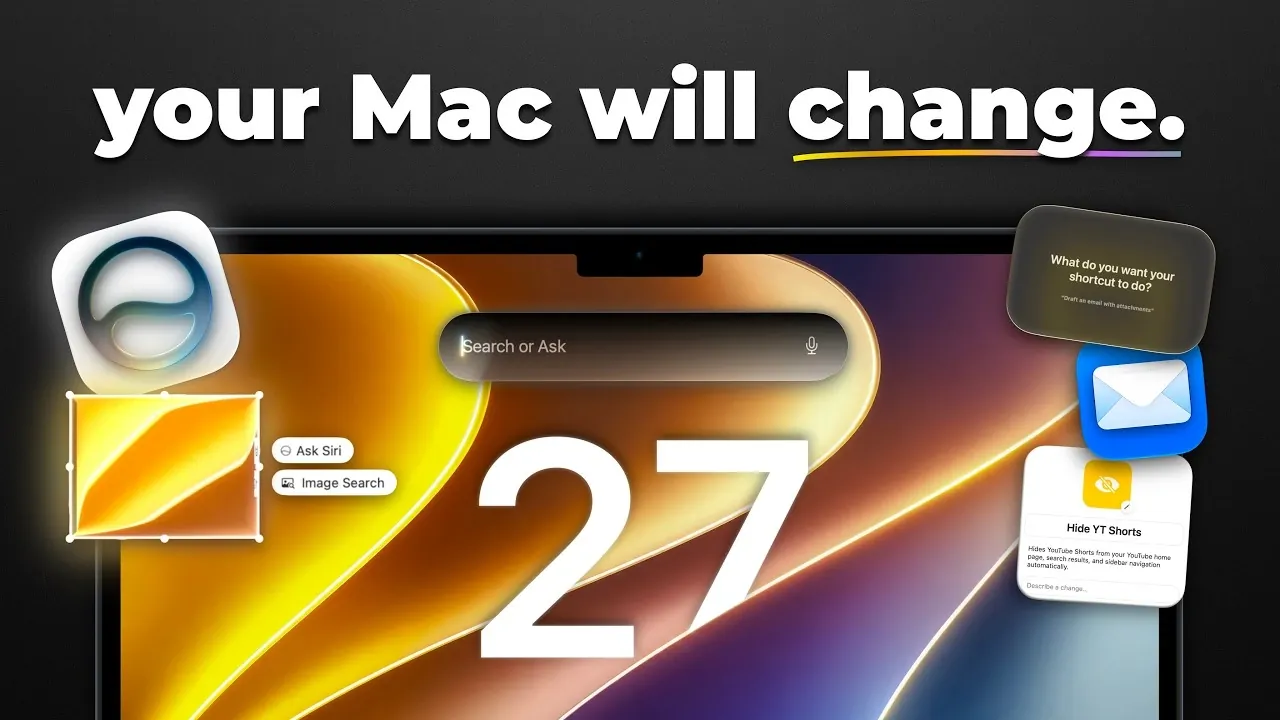
Apple’s macOS 27 Golden Gate introduces a fantastic update that seamlessly blends advanced AI capabilities, enhanced performance, and refined design elements. This release focuses on usability, customization, and innovative tools, aiming to deliver a computing experience that is both intuitive and efficient. Whether you are a professional power user or a casual enthusiast, macOS 27 offers a suite of features designed to enhance productivity, creativity, and personalization. The video below from Mac Vince gives us more details about the new macOS 27.

Refined Design and Visual Enhancements
macOS 27 introduces a visually refreshed interface that balances aesthetics with functionality. The design updates are crafted to improve both usability and visual appeal:
- Liquid Glass Transparency: Customize window opacity to create a desktop environment that reflects your personal style.
- Sharper Visuals: Enhanced app icons and toolbar buttons feature sharper edges and higher contrast, improving visibility and accessibility for all users.
- Streamlined Interface: Windows now feature tighter corner radii, offering a cohesive and modernized look across the system.
- Upgraded Menu Bar: Expandable menu items provide quicker access to essential tools, reducing workspace clutter and improving navigation.
These design improvements ensure that macOS 27 delivers a polished, user-friendly interface that prioritizes both form and function.
Performance Upgrades for Speed and Efficiency
Performance optimization is a cornerstone of macOS 27, making sure faster, smoother, and more reliable system operations. Key upgrades include:
- Enhanced File Sharing: AirPlay and AirDrop now deliver up to 80% faster transfer speeds, making file sharing and media streaming more efficient.
- System-Wide Optimizations: Reduced lag and improved responsiveness enhance the overall user experience, even during demanding tasks.
- Revamped Search Functionality: Reindexed files, apps, and photos enable quicker and more accurate searches, saving time and effort.
These enhancements ensure that macOS 27 performs reliably under heavy workloads, catering to both casual users and professionals who require peak efficiency.
AI-Powered Siri: Smarter and More Versatile
Artificial intelligence takes center stage in macOS 27, with Siri receiving significant upgrades to enhance its capabilities and usability:
- Context-Aware Search: Siri now integrates seamlessly with system-wide search, delivering more relevant and precise results based on context.
- Advanced Functionalities: Perform tasks such as analyzing screenshots, conducting reverse image searches, and accessing contextual insights directly through Siri.
- Siri Chatbot App: A dedicated app with iCloud sync, customizable settings, and real-world knowledge integration makes Siri a versatile tool for both personal and professional use.
These updates position Siri as a powerful assistant, capable of handling complex tasks while remaining user-friendly and accessible.
AI Integration Across Native Applications
macOS 27 uses artificial intelligence to enhance the functionality of its native apps, making everyday tasks faster and more intuitive:
- Safari: Create custom web extensions tailored to your browsing habits using AI-driven prompts.
- Shortcuts: AI-assisted automation simplifies the creation of complex workflows, allowing users to streamline repetitive tasks effortlessly.
- Photos: Advanced AI tools allow for image expansion, reframing, and precise cleanups, empowering users to achieve professional-quality edits with ease.
These AI-driven enhancements demonstrate how macOS 27 integrates innovative technology to improve productivity and creativity across its ecosystem.
Focused Updates to Core Applications
Several core applications in macOS 27 receive targeted updates to improve usability and functionality:
- Apple Notes: Now supports Markdown, allowing easier text formatting and better organization for note-taking.
- Freeform: Introduces folder support and a dark mode option, providing a more structured and visually comfortable workspace.
- Photos: Expanded AI tools offer realistic edits, perspective adjustments, and advanced retouching capabilities, making photo editing more accessible to all users.
These updates cater to a wide range of user needs, from organization and productivity to creative expression.
Expanded Customization and Personalization
macOS 27 emphasizes personalization, allowing users to tailor the system to their unique preferences and workflows:
- Siri Customization: Adjust Siri’s voice with options for accents, expressiveness, and speaking speeds, making sure a more personalized interaction.
- AI-Driven Accessibility: Complex app functionalities are made more accessible through AI tools, simplifying advanced features for all users.
These customization options ensure that macOS 27 adapts seamlessly to individual user needs, enhancing both usability and satisfaction.
macOS 27 Golden Gate: A New Standard in Computing
macOS 27 Golden Gate represents a thoughtful evolution of Apple’s operating system, combining innovation with refinement. Its focus on usability, AI integration and performance optimization creates a computing experience that is intuitive, efficient and highly personalized. From the sleek design updates to the powerful AI-driven tools and enhanced app functionalities, macOS 27 is designed to empower users, making workflows faster, smarter and more enjoyable. Whether you are drawn to its visual enhancements, advanced capabilities, or expanded customization options, macOS 27 sets a new benchmark for modern computing.
Here are additional guides from our expansive article library that you may find useful on macOS 27 Golden Gate.
- The Biggest Changes Coming to macOS 27 Golden Gate
- Why macOS 27 is Officially Apple’s Biggest Mac Update Yet
- The Biggest Hidden Features in the MacOS 27 Golden Gate Beta
Source & Image Credit: MacVince
Disclosure: Some of our articles include affiliate links. If you buy something through one of these links, Geeky Gadgets may earn an affiliate commission. Learn about our Disclosure Policy.
