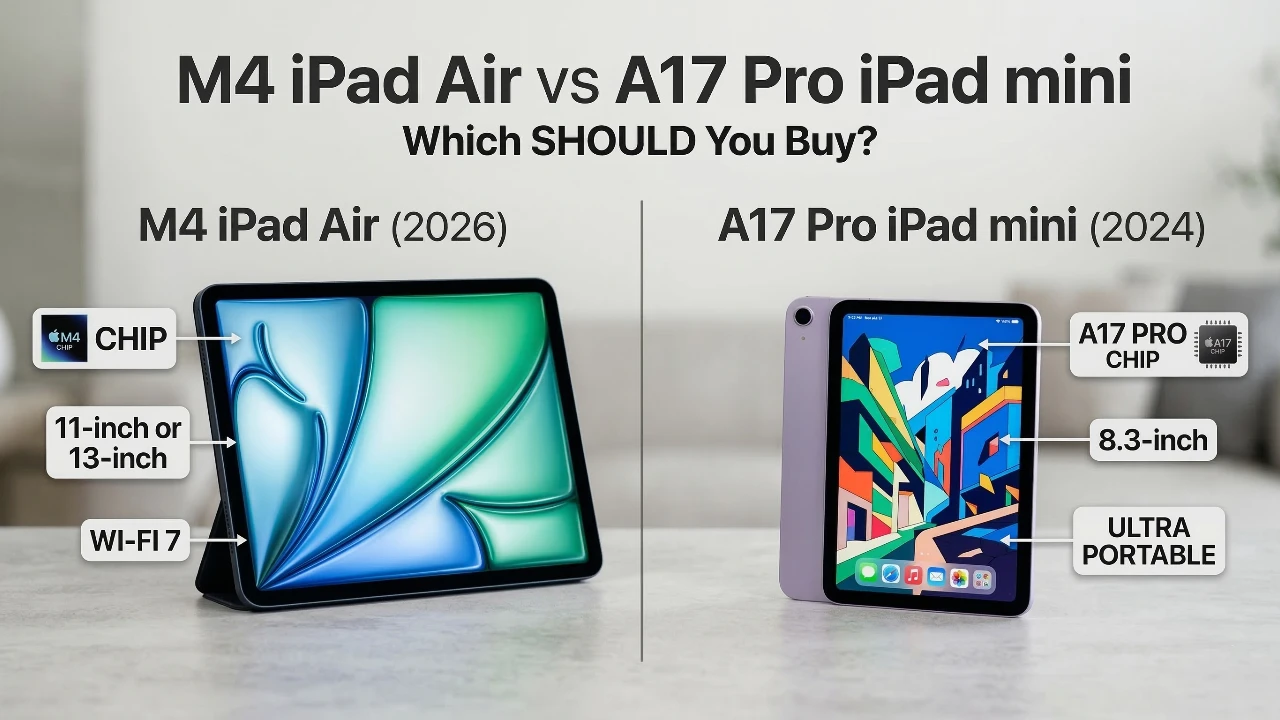
Deciding between the M4 iPad Air and the A17 Pro iPad Mini can be challenging, as both devices cater to different user needs. Whether your focus is on portability, performance, or productivity, understanding the key distinctions between these models will help you make the right choice. In the video below, SaranByte explores their features and capabilities to guide your decision.

Design and Portability
Apple’s signature aluminum design with flat edges and magnetic attachments for the Apple Pencil is present in both devices. However, their size and portability are defining factors that set them apart.
- iPad Mini: Featuring a compact 8.3-inch display, the iPad Mini is designed for one-handed use and maximum portability. Its lightweight build makes it ideal for activities like reading, gaming, or browsing while on the move. This device is particularly suited for users who value convenience and travel-friendly technology.
- iPad Air: Available in 11-inch and 13-inch sizes, the iPad Air offers significantly more screen real estate. This makes it better suited for multitasking, creative projects and productivity tasks. Students, professionals, and creatives will appreciate the larger display for note-taking, designing, or working on multiple apps simultaneously.
Display Technology
Both the iPad Air and iPad Mini feature 60Hz LCD panels with P3 wide color, 500 nits of brightness and anti-reflective coatings. These specifications ensure vibrant visuals and sharp details, making them suitable for content consumption, photo editing and drawing.
While the current displays are impressive, future updates may introduce OLED technology to both models. OLED displays could enhance color accuracy, contrast and overall visual quality. If display performance is a top priority, it might be worth considering waiting for these advancements.
Performance and Processing Power
The performance capabilities of these devices differ significantly, catering to distinct user needs and workloads.
- iPad Air: Equipped with the powerful M4 chip and 12GB of RAM, the iPad Air delivers exceptional CPU and GPU performance. It is designed to handle demanding tasks such as video editing, running professional-grade applications, and multitasking with ease. For users seeking a laptop replacement or a device for intensive workflows, the iPad Air is a compelling choice.
- iPad Mini: Powered by the A17 Pro chip and 8GB of RAM, the iPad Mini is optimized for lighter workloads. It excels in casual use cases such as gaming, streaming and mobile applications. While it offers reliable performance, it is not intended for heavy-duty tasks, making it a better fit for users who prioritize simplicity and efficiency.
Battery Life
Both devices promise up to 10 hours of usage, ensuring all-day performance for most users. However, the iPad Mini’s smaller size and lower power requirements make it slightly more efficient under lighter workloads. This makes it an excellent choice for users who prioritize battery longevity over raw processing power.
Accessory Compatibility
Accessories can significantly enhance the functionality of your iPad, and the iPad Air offers broader compatibility in this regard.
- iPad Air: Compatible with the Magic Keyboard, the iPad Air can transform into a laptop-like device, making it ideal for productivity tasks. It also supports both the Type-C and Pro versions of the Apple Pencil. The Pro version provides advanced features such as enhanced pressure sensitivity and tilt recognition, which are valuable for creative professionals.
- iPad Mini: While the iPad Mini supports the Apple Pencil, it lacks compatibility with the Magic Keyboard. This limitation makes it less versatile for users who require a device for extensive typing or productivity-focused tasks.
Camera Features
Both models feature similar rear and front cameras with Center Stage technology, which ensures you remain in the frame during video calls. However, the orientation of the front cameras differs between the two devices.
- iPad Air: The landscape-oriented front camera is better suited for video conferencing in horizontal mode. This feature is particularly useful for professionals who frequently participate in virtual meetings or presentations.
- iPad Mini: The portrait-oriented front camera aligns with the device’s casual and portable nature, making it more convenient for vertical use, such as quick video calls or selfies.
Wireless Connectivity
Connectivity options vary slightly between the two models, with the iPad Air offering more advanced features.
- iPad Air: Supports Wi-Fi 7, Bluetooth 6, and advanced 5G modems. These features ensure faster and more reliable connections, making the iPad Air a future-proof choice for users who rely heavily on wireless connectivity for work or entertainment.
- iPad Mini: While it uses slightly older wireless standards, the iPad Mini’s connectivity options are sufficient for casual users. However, those requiring innovative performance may find these limitations restrictive.
Storage and Pricing
Both models start with 128GB of storage, which may feel limited for users with extensive media libraries or professional workflows. Pricing reflects the performance and feature differences between the two devices.
- iPad Mini: Starting at $499, the iPad Mini is a more affordable option for casual users who prioritize portability and simplicity.
- iPad Air: Starting at $599 for the 11-inch model, the iPad Air justifies its higher price with superior performance, larger display options and broader accessory compatibility.
Use Cases
The choice between the iPad Air and iPad Mini ultimately depends on your specific needs and intended use cases.
- iPad Mini: Best suited for casual use, including reading, gaming and media consumption. Its compact size and lightweight design make it an excellent travel companion or secondary device for quick tasks.
- iPad Air: Ideal for students, professionals and creatives who require a versatile device capable of handling intensive workloads. Its larger display, powerful performance and accessory support make it a strong contender as a laptop replacement.
Specifications Summary
| Feature | iPad Air (M4, 2026) | iPad mini (A17 Pro, 2024) |
| Processor | M4 Chip (8-core CPU / 9-core GPU) | A17 Pro (Hexa-core) |
| Display | 11-inch or 13-inch Liquid Retina | 8.3-inch Liquid Retina |
| Memory | 12GB (Significant for iPadOS 26) | 8GB |
| Connectivity | Wi-Fi 7, Bluetooth 6, 5G | Wi-Fi 6E, Bluetooth 5.3, 5G |
| Best For | Laptop replacement & creative work | Portability, reading & handheld gaming |
| Price | From $599 / £599 | From $499 / £499 |
Future Considerations
Both models are expected to adopt OLED displays in future updates, which could significantly enhance visual quality. If display performance is a critical factor for you, waiting for these improvements might be a strategic decision. Additionally, as Apple continues to refine its hardware and software ecosystem, future iterations of these devices may introduce new features that further differentiate them.
The decision between the M4 iPad Air and the A17 Pro iPad Mini comes down to your priorities. Carefully evaluate your needs, whether they center on portability, performance, or productivity, to determine which device aligns best with your lifestyle.
Here are additional guides from our expansive article library that you may find useful on the M4 chip.
- M5 Mac Mini Leak: Features, Release Date and More
- M4 iPad Air Release Date, Features and Pricing Explained
- MacBook Air M4 is COMING! Price & Release Date
- Apple M4 iPad Air: Everything You Need to Know
- M4 iPad Air: What to Expect in Apple’s 2026 Model
Source: SaranByte
Disclosure: Some of our articles include affiliate links. If you buy something through one of these links, Geeky Gadgets may earn an affiliate commission. Learn about our Disclosure Policy.
