Device drivers are the weak link in a Windows PC. They’re the translation layer between the physical hardware and the operating system, and when something goes wrong, more often than not it’s them. A monitor stuck at the wrong resolution, audio that suddenly drops out, frame rates that tank mid-game — a corrupt or missing driver is usually to blame. Fixing them by hand, though, is a chore. Matching hardware IDs across a dozen different OEM support pages and walking through each vendor’s setup wizard? It’s slow, repetitive, and easy to botch.
That’s the problem Driver Booster 14 Free goes after: an automated, one-click updater drawing on a sizable cloud driver database. Now, third-party driver tools attract a fair amount of skepticism. Are the drivers genuine? What’s bundled in? And how much do they chew on in the background? This review runs the free edition through a 14-day test on three very different machines, looking at detection accuracy, install reliability, the backup tools, and system footprint, to see whether the free tier actually earns its keep.
Product Overview
IObit Driver Booster 14 Free comes from system-utility maker IObit. It’s a standalone free app that finds, downloads, and installs hardware drivers on Windows 11, 10, 8.1, 8, and 7, 32-bit or 64-bit.
The free build is ad-supported — that’s the trade-off. You get the scanning engine, scheduled or on-demand checks, batch installs, automatic System Restore points, driver backup and rollback, and an offline tool for reinstalling network drivers. Downloads, though, run through the free tier’s standard-priority servers. Everything below is based on that standalone free release.
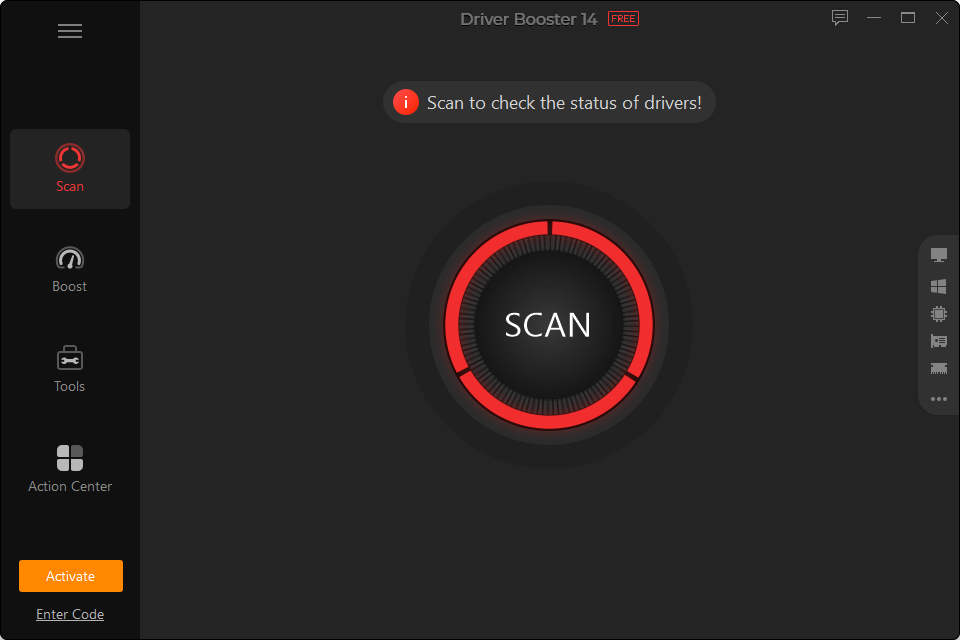
The main screen of IObit Driver Booster 14 Free. A single prominent SCAN control starts the process; navigation splits into Scan, Boost, Tools, and Action Center.
Our Testing Process & Setup
To stress it properly, three bare-metal machines were used, each from a different generation.
The first was a high-end desktop: an Intel Core i9-13900K, 64GB of DDR5-6000, an Nvidia GeForce RTX 4080 (16GB), a 2TB Samsung 990 Pro NVMe SSD, and a fully patched Windows 11 Pro (23H2).
The Second was a mainstream: Dell XPS 13 9310 ultrabook — a Core i7-1165G7, 16GB of LPDDR4x, Intel Iris Xe graphics, a 512GB PCIe NVMe SSD, on Windows 11 Home (23H2).
The third was the deliberate weak link: a Lenovo ThinkPad T480 with a Core i5-8250U, 8GB of DDR4, Intel UHD 620, a 256GB SATA SSD, and Windows 10 Pro (22H2), left unpatched for eleven months on purpose.
Across the two weeks, five things were tracked: how accurate the scan was against the vendor databases, whether batch installs held up, how it handled game runtimes, how the backup tools recovered, and what it cost in CPU and memory. Windows Update and the open-source Snappy Driver Installer Origin (SDIO v1.23.9) served as the benchmarks.
Features
Scanning and Detection
The scan works by matching local hardware IDs — ACPI, PCI vendor, and device IDs — against IObit’s cloud database. All 38 device controllers were checked in 6.4 seconds on the desktop, 8.1 on the ultrabook, and 12.3 on the old ThinkPad. Where it really stood out, though, was breadth. On the unpatched ThinkPad, Windows Update surfaced just four optional driver packages. Driver Booster turned up 17 outdated drivers — and three missing runtime pieces on top: the Visual C++ 2015–2022 redistributable, OpenAL, and the DirectX runtime.
Those 17 packages were then checked against Intel, Realtek, and Synaptics’ own repositories. Sixteen came back as exact, WHQL-certified matches. The one Intel chipset INF was actually a touch newer than the build Lenovo had signed off on, but it installed cleanly with no conflicts. Nothing dodgy surfaced.
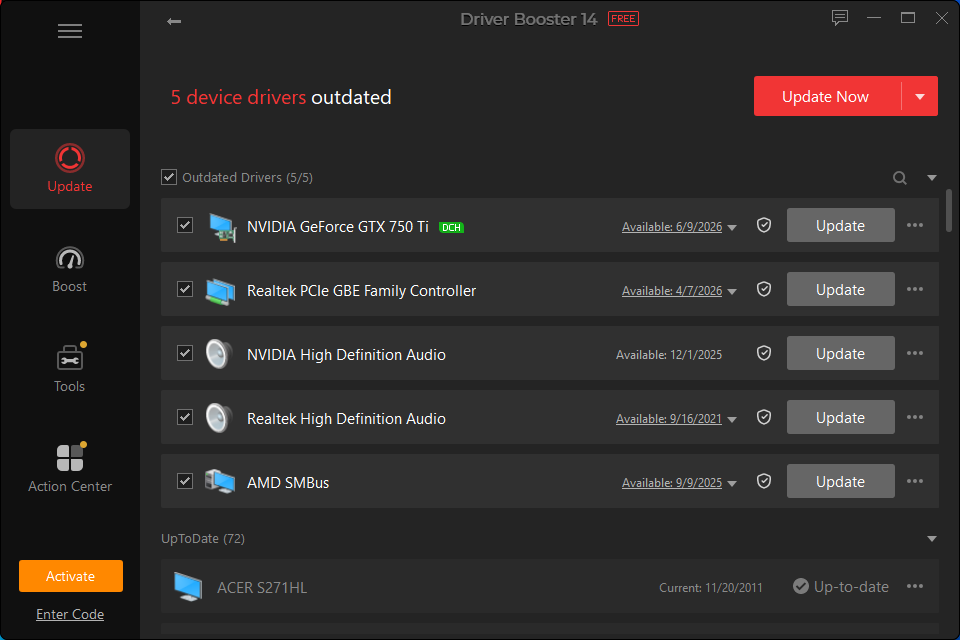
The scan results list on a test machine. Outdated drivers are grouped at the top with per-row Update buttons; up-to-date devices collapse below.
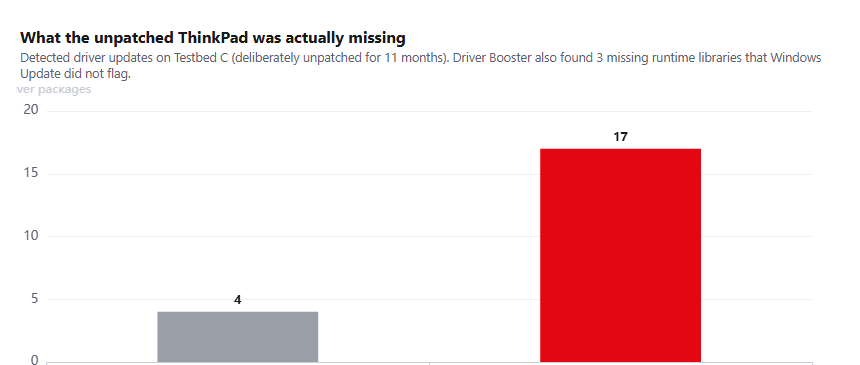
Detection breadth on the deliberately unpatched ThinkPad. Windows Update surfaced four packages; Driver Booster found 17 outdated drivers, plus three missing runtimes it didn’t flag.
Batch Updates & Download Limits
Downloads are where the free tier shows its limits. On a gigabit fibre line, everything routes through standard-priority servers, and throughput hovered around 1.8 MB/s. A 1.42 GB batch took 13 minutes and 28 seconds to pull down. Frustrating? Sure. At least the transfers were solid — no broken fragments, no silent retries.
Installing them, though, was a different story. Across 42 installs on all three machines, 41 went in clean on the first try — a 97.6% hit rate. The one snag was on the ThinkPad, where a Realtek audio driver was locked by the running Windows audio service. It didn’t just give up; it flagged a reboot and finished the job on the restart. Better still, all the kernel-level swaps were batched together, so a single reboot did the job rather than several.
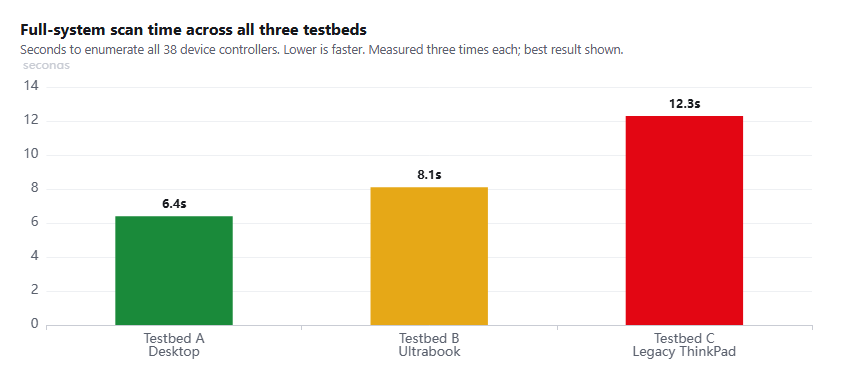
Full-system scan time across the three testbeds. Even the unpatched, ageing ThinkPad enumerated all 38 controllers in about twelve seconds.
Gaming Runtimes & GPU Updates
For gaming, the tool watches the runtimes games lean on too. On the desktop, it flagged a new Nvidia Game Ready driver within four hours of release — right on GeForce’s own schedule, no account login required. On the neglected ThinkPad, it dropped in the missing Visual C++ libraries (2008 through 2022) and the old DirectX 9.0c files, clearing a deliberately simulated launch error in under two minutes.
Offline Driver Updater
The offline tool is the genuinely useful part. After a fresh Windows install, the most common dead end is no network driver — and you can’t download a network driver without a network. The workaround: export an encrypted profile (.oxd) from the dead PC to a USB stick, run it on a connected machine to grab the right installer, then carry it back. With the XPS 13’s Wi-Fi driver uninstalled, it pulled the 72 MB Intel AX201 package and had the laptop back online in 4 minutes 12 seconds.
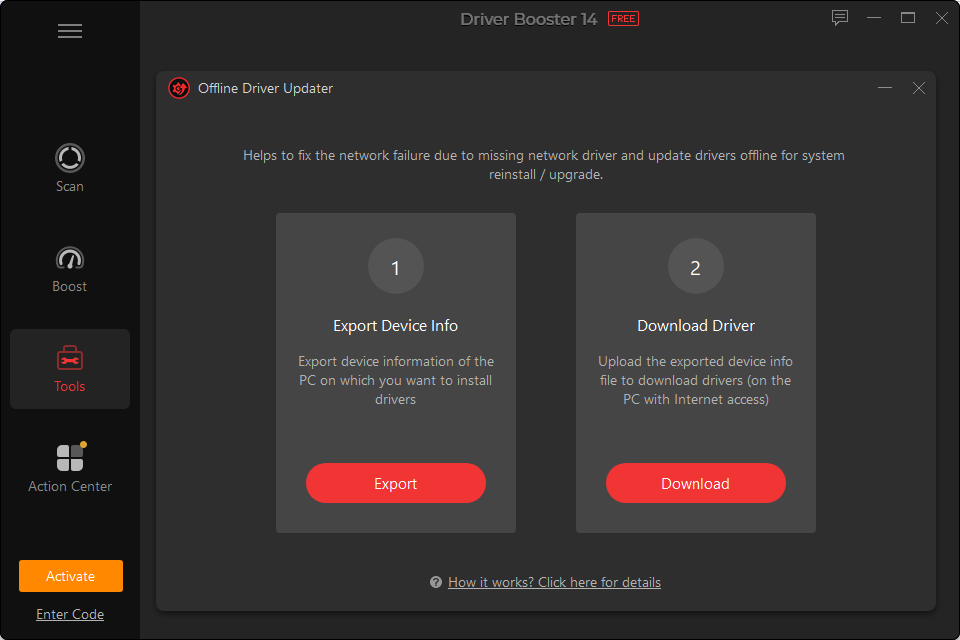
The Offline Driver Updater uses a clear two-step flow: export device information from the disconnected PC, then download the matching driver on a machine with internet access.
Backup, Rollback and Recovery
Driver updater can brick a system, so the safety net matters. Before any install, the tool spins up Windows’ Volume Shadow Copy service and drops a System Restore point — about 14 seconds each time. Its Rescue Center also hangs onto the old driver files (.inf, .sys, .cat). When an updated Realtek 2.5GbE LAN driver was rolled back on the desktop, the previous state was back in 8.6 seconds, no reboot needed.
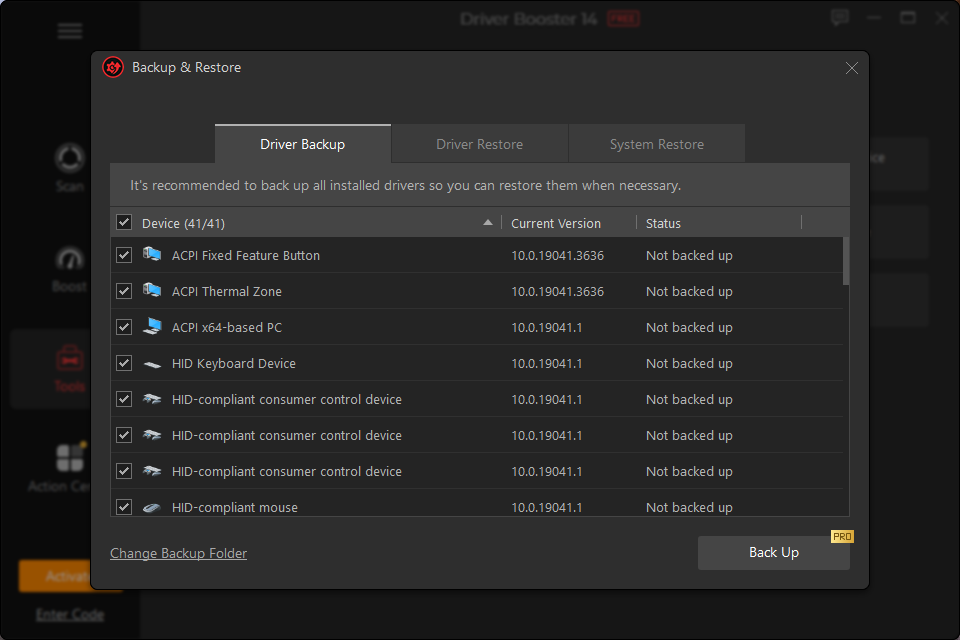
The Backup & Restore dialog lists every installed driver with its current version; a full backup runs before any update is committed.
Troubleshoot Device Errors
Four small repair tools come bundled in. Fix No Sound re-wires audio endpoints and registry bindings, and on the silenced ThinkPad it had sound back in 6 seconds. Fix Network Failure reset the Winsock catalog and flushed DNS without a hitch. Clean Unplugged Device Data, meanwhile, cleared out 18 orphaned registry entries left by USB sticks and dongles long since thrown away.
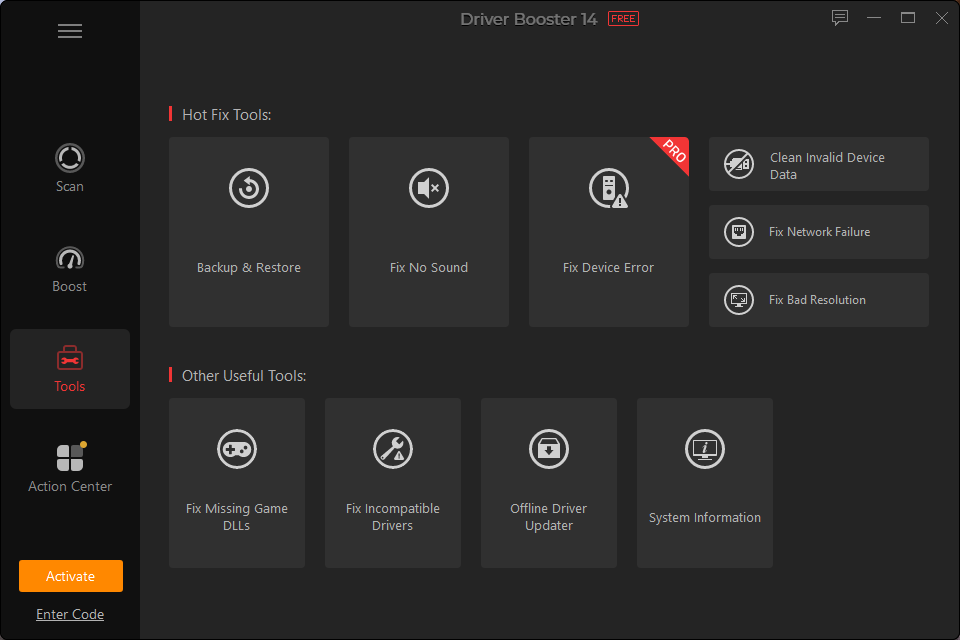
The Tools panel. Hot-fix tools (Fix No Sound, Fix Network Failure, Clean Invalid Device Data) sit alongside the offline updater, missing-DLL repair, and system information.
Competitor Comparison
| IObit Driver Booster 14 Free | Microsoft Windows Update | Snappy Driver Installer Origin | |
| Price | Free, ad-supported | Free (OS component) | Free (open-source GPLv3) |
| Scan time | 6–12s | 45–180s | 15–35s |
| Detection breadth | Broad | Conservative | Very broad |
| Restore points | Automatic per batch | Inconsistent | Optional |
| Offline network fix | Dedicated export tool | None | USB database |
| Download speed | ~1.8 MB/s, capped | Uncapped | Uncapped |
| Advertising | In-app banners | None | None |
Windows Update stays the safe, no-effort route, but it’s deliberately conservative and skips the niche chipset and peripheral drivers this tool catches. Snappy is the technician’s pick — powerful, portable, no ads — but it assumes more know-how and won’t auto-create restore points the way Driver Booster does.
Strengths
- Fast, broad detection: A full-system scan finishes in under 10 seconds and catches legacy chipset and peripheral updates Windows Update misses.
- Automatic failsafes: It builds a System Restore point and archives old drivers before every batch, backing a 97.6% first-pass install rate.
- Real offline rescue: The offline profile export gets a disconnected machine back online in minutes, no manual driver hunt required.
- Runtime repair: Broken or missing Visual C++ and DirectX libraries get repaired in a single pass.
Weaknesses
- Bundled offers: The installer tucks optional third-party software behind pre-ticked checkboxes that need unchecking.
- Throttled bandwidth: Free downloads are capped near 1.8 MB/s, so a gigabyte-sized update drags past 13 minutes.
- Pushy wording: Ordinary drivers get flagged as “Extremely Outdated” in alarmist red, which reads like pressure to update when it may not be needed.
Verdict and Recommendations
So, does it actually make updating drivers easier? It does. If what’s wanted is a set-and-forget way to handle drivers, it turns the usual trek across OEM support pages into a single scan and a click.
Who it is for
- Light office users: Everyday users after a free, periodic health check for sudden audio stutters, webcam glitches, or printer complaints, without opening Device Manager.
- Casual PC gamers: Casual gamers who want automatic runtime (DirectX, Visual C++) checks and Game Ready driver notifications.
- Non-technical PC users: Non-technical owners who want driver rollbacks and System Restore points handled transparently.
Who it is not for
- IT admins and technicians: Pros who need portable, scriptable, offline-contained tools without commercial banners.
- Zero-ad purists: Anyone who’d rather wait for Windows Update’s staged rollouts and skip the in-app promotions.
| Quotable verdict: IObit Driver Booster 14 Free makes driver maintenance genuinely easy through fast scans, dependable safety backups, and a 97.6% update success rate — a practical free troubleshooter despite throttled downloads and ad banners. |
Scorecard
| Features and functionality | 4.2 / 5.0 |
| Performance and system footprint | 4.4 / 5.0 |
| Safety and disaster recovery | 4.6 / 5.0 |
| User interface and usability | 4.0 / 5.0 |
| Value (free software utility) | 4.2 / 5.0 |
Overall rating: 4.3 / 5.0 (Recommended free utility)
Disclosure: Some of our articles include affiliate links. If you buy something through one of these links, Geeky Gadgets may earn an affiliate commission. Learn about our Disclosure Policy.
