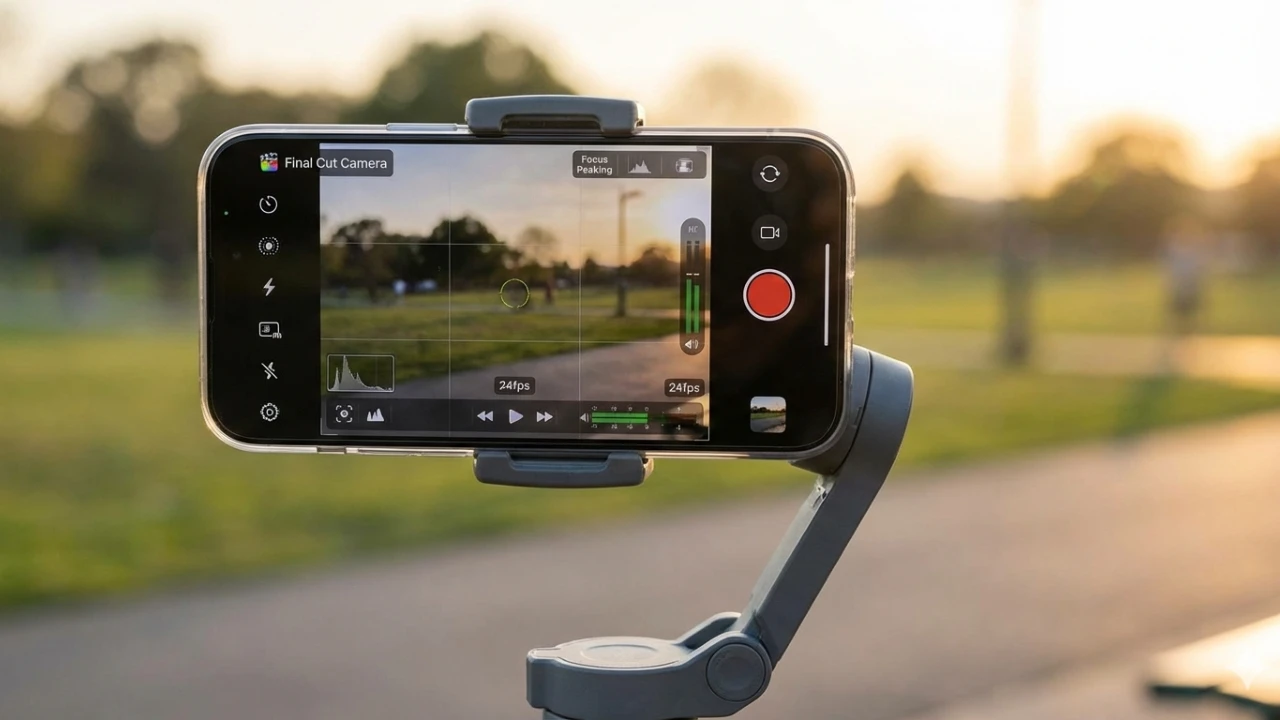
The Final Cut camera app for iPhone transforms your device into a professional-grade video recording tool, offering advanced features and precise controls that rival dedicated equipment. Whether you’re an aspiring filmmaker or a seasoned content creator, this app enables you to produce high-quality, cinematic videos directly from your smartphone. By combining intuitive design with robust functionality, the app provides the tools necessary to elevate your video production to a professional standard. Here’s how it helps you achieve exceptional results. The video below from Jacob’s QuickTips for iPhone shows us how this is done.

Lock Orientation for Consistent Framing
Maintaining a stable orientation is essential for creating polished and visually cohesive videos. The Final Cut app allows you to lock your camera in either landscape or portrait mode, making sure consistent framing throughout your recording. This feature eliminates the risk of accidental shifts in orientation, which can disrupt the flow of your footage and compromise its professional appearance. By locking the orientation, you gain greater control over your composition, making it easier to produce seamless and visually appealing videos. This functionality is particularly useful for projects requiring uniform framing across multiple scenes.
Take Control with Manual and Autofocus
Focus is a powerful storytelling tool, and the Final Cut app provides the flexibility to master it. With the ability to toggle between manual and autofocus modes, you can adapt to various creative needs. Manual focus allows you to emphasize specific subjects, creating depth and directing the viewer’s attention to key elements within the frame. On the other hand, autofocus ensures clarity in fast-paced or dynamic scenes, where precision is critical. This dual functionality enables you to capture cinematic shots with precision, enhancing the overall visual impact of your videos. Whether you’re filming a dramatic close-up or a fast-moving action sequence, the app ensures your focus remains sharp and intentional.
Fine-Tune Exposure for Perfect Lighting
Lighting plays a pivotal role in video production, and the Final Cut app offers comprehensive exposure controls to help you achieve the perfect balance. You can manually adjust key settings such as shadows, highlights, ISO, and shutter speed, giving you full control over how light interacts with your scene. This level of customization is invaluable in challenging conditions, such as low-light environments or high-contrast scenarios. By fine-tuning exposure, you can ensure your videos are well-lit and visually striking, regardless of the shooting environment. The app’s precise controls allow you to adapt to changing lighting conditions, making sure your footage maintains a professional quality.
Achieve True-to-Life Colors with White Balance
Accurate color representation is critical for creating professional-quality videos, and the Final Cut app’s white balance calibration ensures your footage looks natural and consistent. Using intuitive sliders or pre-set options, you can adjust the color temperature to match various lighting conditions, whether you’re filming under natural sunlight, fluorescent lights, or incandescent bulbs. This feature helps maintain color accuracy across multiple shots, making sure a cohesive and polished final product. By achieving true-to-life colors, you can enhance the emotional tone of your videos and create a more immersive viewing experience.
Zoom with Precision
The Final Cut app offers precise zoom controls that go beyond the limitations of the default iPhone camera. Whether you’re capturing expansive landscapes or intricate close-ups, the app allows you to make subtle adjustments to frame your shots exactly as you envision. This level of control enhances your creative flexibility, allowing you to compose shots that align perfectly with your storytelling goals. The ability to zoom with precision ensures that every detail is captured with clarity, adding depth and dimension to your videos.
Advanced Customization for Cinematic Results
What sets the Final Cut app apart is its suite of advanced customization options, designed to give you greater control over your video recordings. From locking orientation to manual focus, exposure adjustments, white balance calibration, and precise zoom, every feature is tailored to help you achieve cinematic results. These tools allow you to adapt your settings to match your creative vision, making sure that your videos meet professional standards. The app’s intuitive interface makes these advanced features accessible, even for users who are new to video production.
Why the Final Cut Camera App Stands Out
The Final Cut app bridges the gap between the convenience of smartphone filming and the precision of professional-grade video production. Its user-friendly design ensures that even complex features are easy to navigate, while its robust customization options cater to filmmakers who demand precision and control. Whether you’re creating a short film, a promotional video, or a creative project, this app equips you with the tools to bring your ideas to life. By combining advanced functionality with an intuitive interface, the Final Cut app enables users to produce videos that stand out for their professional quality and visual appeal.
Expand your understanding of Professional Video Recording with additional resources from our extensive library of articles.
- iSpyPen Pro X 2K HD Recording Camera Pen | StackSocial
- Screen Grabber Pro: Lifetime License | StackSocial
- Alpha Z PRO 4K + Flying Fox 4K Wide-Angle Dual-Camera Drone
- Canvid AI-Powered Video Creator & Editor: Lifetime Subscription
- iPhone 17 Pro: Best Camera Features for Photography
Source & Image Credit: Jacob’s QuickTips for iPhone
Disclosure: Some of our articles include affiliate links. If you buy something through one of these links, Geeky Gadgets may earn an affiliate commission. Learn about our Disclosure Policy.
