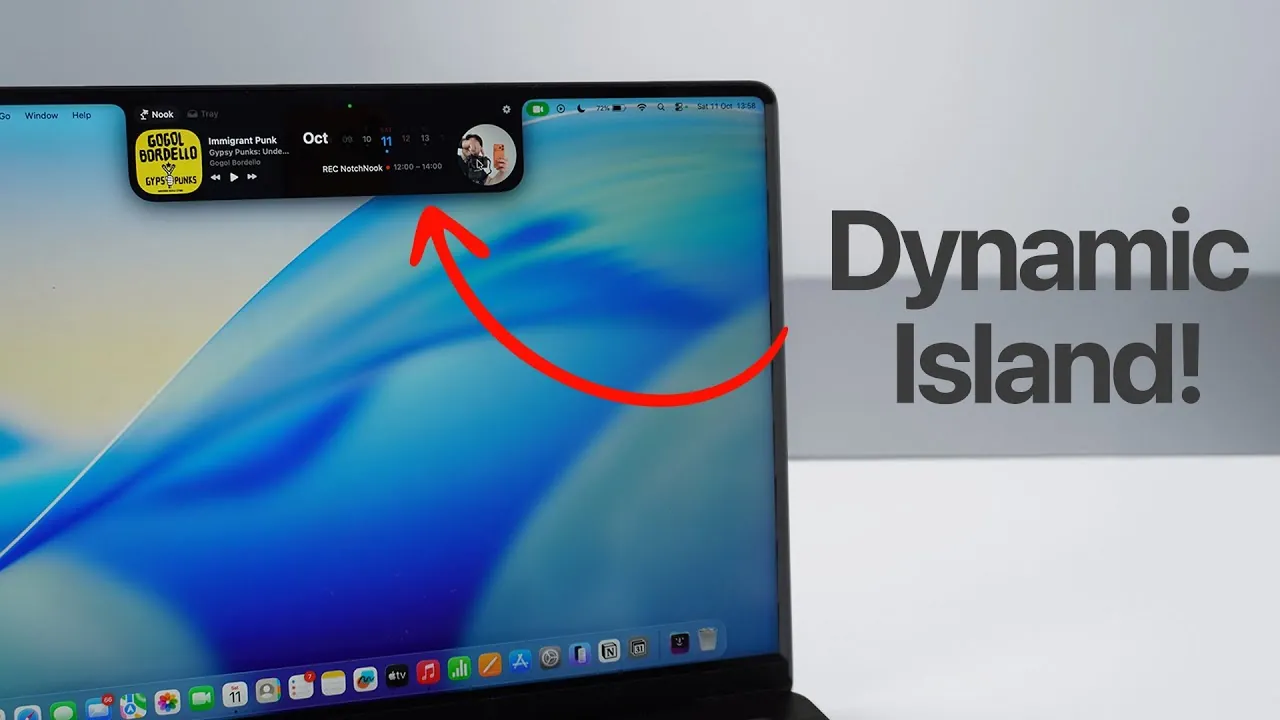
Imagine turning your MacBook’s notch from a simple design feature into a functional, interactive tool that enhances your productivity. With Notchnook, this vision becomes a reality. This innovative software redefines the way you interact with your MacBook by transforming the static notch into a “dynamic island.” By seamlessly integrating with macOS, Notchnook introduces a range of features, including interactive widgets, file management tools, and extensive customization options. This transformation not only enhances usability but also makes the notch an integral part of your workflow. The video below from Daniel About Tech gives us more details on how this is done.
What Is Notchnook and How Does It Work?
Notchnook is a software solution designed to give the MacBook’s notch a purpose beyond aesthetics. It introduces two primary modes that work together to create a cohesive and efficient user experience:
- Nook Mode: A space dedicated to interactive widgets that provide quick access to essential tools and information.
- Tray Mode: A streamlined file management system that simplifies how you organize and access files.
These modes are designed to feel native to macOS, ensuring a seamless integration that enhances your productivity. Whether you’re accessing widgets or managing files, Notchnook ensures the notch becomes a functional and valuable part of your daily workflow.
Interactive Widgets: Enhancing Productivity
One of the standout features of Notchnook is its interactive widgets, which provide quick access to tools and information without disrupting your workflow. These widgets are designed to remain accessible across all applications, even in full-screen mode, ensuring uninterrupted productivity. Some of the key widgets include:
- Media Controls: Manage playback for Apple Music or Spotify directly from the notch.
- Calendar Integration: View and manage event reminders to stay on top of your schedule.
- Webcam-Based Mirror: Use your webcam as a quick mirror for convenience, with privacy safeguards in place.
- Sticky Notes: Jot down ideas, reminders, or to-do lists for easy reference.
These widgets are fully customizable, allowing you to adjust their appearance and functionality to suit your preferences. This flexibility ensures that the widgets adapt to your specific needs, making them a valuable addition to your workflow.
Streamlined File Management with Tray Mode
Notchnook’s Tray Mode simplifies file management by providing a dedicated space for organizing and accessing frequently used files. This feature is designed to save time and reduce the friction often associated with managing files on macOS. Key functionalities of Tray Mode include:
- Drag-and-Drop Functionality: Quickly add files to the tray for easy access.
- File Renaming: Rename files directly from the tray without navigating through multiple menus.
- AirDrop Integration: Share files via AirDrop with fewer steps, streamlining the process compared to native macOS methods.
By centralizing file management within the notch, Notchnook ensures that your most important files are always within reach, helping you stay organized and efficient.
Privacy and Security: Built-In Safeguards
Notchnook prioritizes your privacy and security while delivering its innovative features. For instance, the webcam-based mirror widget activates the green LED indicator whenever the webcam is in use, ensuring transparency. Additionally, the webcam automatically deactivates as soon as your cursor moves away from the widget. These safeguards provide peace of mind, allowing you to use the software’s features without compromising your privacy.
Customizing Your Notchnook Experience
Personalization is a core aspect of Notchnook, allowing you to tailor its features to your specific needs. The software offers a range of customization options, including:
- Widget Settings: Adjust the appearance and functionality of widgets to match your preferences.
- Calendar Integration: Link your preferred calendar accounts for seamless scheduling and reminders.
- File Tray Organization: Arrange files in the tray to align with your workflow and priorities.
This level of customization ensures that Notchnook adapts to your unique requirements, making it a versatile tool for enhancing your MacBook experience.
Getting Started with Notchnook
Setting up Notchnook is a straightforward process. The software offers a free trial, allowing you to explore its features before committing to a purchase. Once installed, Notchnook replaces the static notch with a dynamic, interactive interface that integrates seamlessly with macOS. The intuitive setup process ensures that you can start using its features immediately, transforming your MacBook into a more efficient and personalized workspace.
Reimagining the MacBook Notch
Notchnook redefines the MacBook’s notch by turning it into a functional and interactive tool that enhances productivity. With its combination of interactive widgets, streamlined file management, and robust customization options, Notchnook seamlessly integrates with macOS to deliver a more intuitive and efficient user experience. Whether you’re managing files, staying organized, or customizing your workspace, Notchnook transforms the notch into a central hub for productivity, helping you make the most of your MacBook.
Browse through more resources below from our in-depth content covering more areas on Dynamic Island for Mac.
- Apple’s M5 MacBook Pro: OLED Display and Next-Gen Features
- M5 MacBook Pro Design Changes Revealed in New Leak
- Apple’s Mac Mini gets the iFixit treatment
- OS X Mountain Lion 10.8 Developer Preview Released By Apple
- Is the M4 Mac Mini the Best Budget PC Alternative?
Source & Image Credit: Daniel About Tech
Disclosure: Some of our articles include affiliate links. If you buy something through one of these links, Geeky Gadgets may earn an affiliate commission. Learn about our Disclosure Policy.
