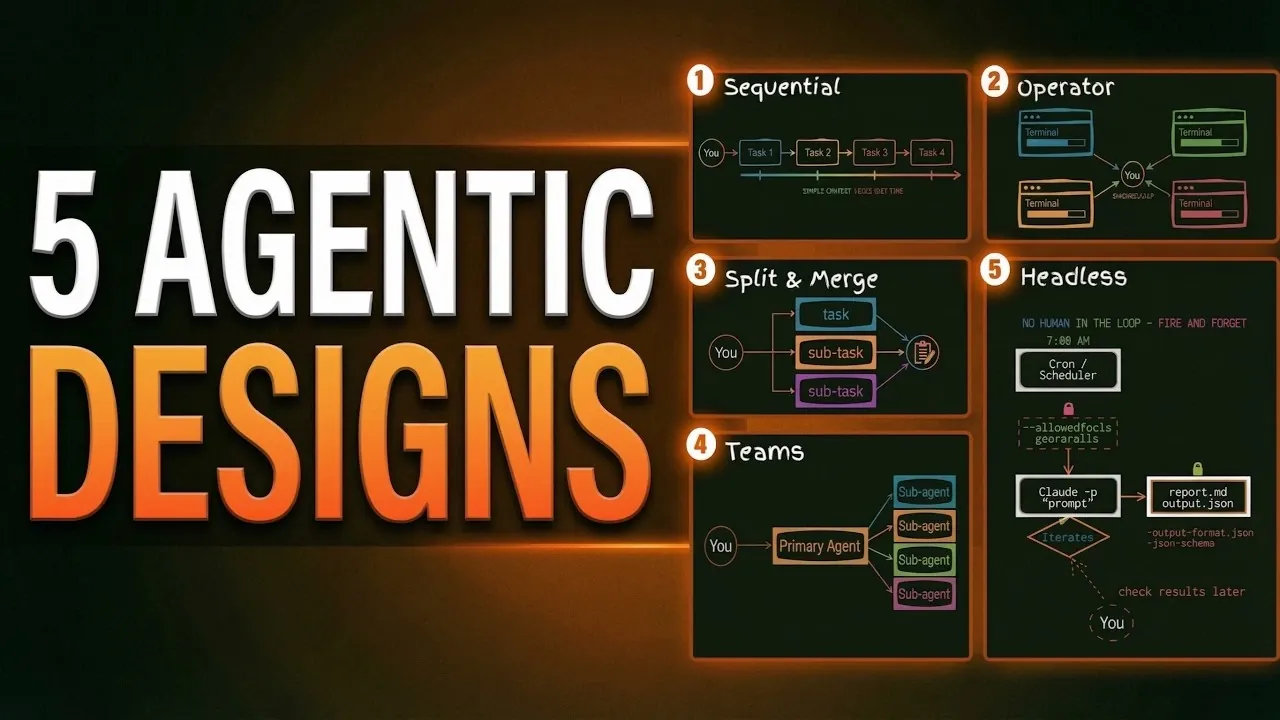
Claude Code offers a structured approach to managing tasks, with workflows designed to address everything from straightforward linear processes to highly complex, autonomous operations. Simon Scrapes breaks down these workflows in detail, highlighting how features like the Sequential Flow can maintain consistent context for simple, step-by-step tasks, while the Operator Pattern enables parallel execution across multiple projects. Each workflow is built on Claude Code’s three core sub-agents, Explore, Plan and General Purpose, making sure flexibility and adaptability for a wide range of scenarios.
In this feature, you’ll gain insight into when to use workflows like Split and Merge for breaking down multifaceted tasks or Headless Mode for fully automated operations. Discover how advanced features such as custom sub-agents and builder-validator chains can enhance precision and reduce errors. Whether you’re managing collaborative projects or automating repetitive tasks, this guide provides actionable strategies to help you choose and implement the right workflow for your needs.
Built-in Sub-Agents: The Core of Claude Code
TL;DR Key Takeaways :
- Claude Code offers five primary workflows, Sequential Flow, Operator Pattern, Split and Merge, Agent Teams and Headless Mode, tailored to different task complexities and collaboration needs.
- Three built-in sub-agents (Explore, Plan and General Purpose) form the foundation of workflows, allowing efficient task delegation and execution.
- Advanced features like Custom Sub-Agents, Builder-Validator Chains and Scheduling Tools Integration enhance workflow customization, accuracy and automation.
- Key limitations include context window constraints, high token usage for Agent Teams and trust challenges in fully autonomous Headless Mode workflows.
- By selecting the right workflow and using advanced features, users can optimize productivity, reduce manual effort and achieve superior task outcomes with Claude Code.
At the heart of Claude Code are its three built-in sub-agents, each designed to handle specific tasks efficiently. These sub-agents form the foundation for all workflows, allowing you to delegate tasks effectively and maintain focus on broader objectives.
- Explore: Operates in a read-only mode to analyze files and folder structures, making it ideal for gathering information from codebases or other structured data sources.
- Plan: Focuses on analyzing codebases and creating strategies, also in a read-only capacity, to assist with project planning and organization.
- General Purpose: Handles complex, multi-step tasks with full tool access, offering the flexibility to tackle diverse and dynamic requirements.
These sub-agents provide the building blocks for more advanced workflows, making sure efficient task execution and seamless integration into your processes.
Key Workflow Patterns
Claude Code supports a variety of workflow patterns, each tailored to different levels of task complexity and collaboration. Understanding these patterns allows you to select the most effective approach for your specific needs.
1. Sequential Flow
Sequential workflows involve tasks that progress step-by-step within a single session. This straightforward approach is particularly useful for linear tasks where maintaining continuous context is essential. However, the size of the context window can limit this workflow, potentially leading to “context rot” as older information is overwritten. Tools such as /clear and /compact can help manage these limitations by resetting or condensing the context.
Best for: Simple, linear tasks that require consistent context throughout execution.
2. Operator Pattern
The operator pattern enables you to run multiple Claude sessions in parallel, with each session operating in a separate terminal. This setup is ideal for independent tasks that do not rely on shared information, as each session maintains a clean and isolated context window. It is particularly effective for managing multiple projects simultaneously without risking cross-contamination of data or context.
Best for: Independent, parallel tasks across multiple projects or domains.
3. Split and Merge
This workflow divides a larger task into smaller components, assigning each to a sub-agent within a single session. Each sub-agent works on its specific component in parallel and their results are later merged into the main session. While this approach is effective for breaking down complex tasks, it requires careful planning and coordination, as sub-agents cannot communicate directly with one another.
Best for: Large, multifaceted tasks that can be broken into smaller, independent components.
4. Agent Teams
Agent teams involve multiple agents collaborating on a shared task list. These agents can dynamically share findings and adapt to changes, making this workflow highly effective for interdependent and complex tasks. However, it requires manual activation as an experimental feature and consumes a significant number of tokens, which may impact resource allocation.
Best for: Collaborative, adaptive tasks requiring high levels of coordination and flexibility.
5. Headless Mode
Headless mode enables fully autonomous workflows that require no user interaction. Tasks are executed independently and results are delivered upon completion. This workflow is particularly useful for batch processing or scheduled tasks, such as generating reports or analyzing large datasets. However, it requires trust in Claude’s autonomy and is best suited for tasks with clear, measurable outcomes.
Best for: Automated, repetitive tasks with straightforward and verifiable outputs.
Discover other guides from our vast content that could be of interest on Claude Code.
- Anthropic Claude Code Review Preview: Multi-Agent Pull Request Reviews
- The Claude Code Leak Explained: Kyros, Ultra Plan & New Models
- Claude Code Skills 2.0 : Workflow Skills vs Capability Uplift Skills
- Claude Code 2 Feature Update: Automation, Workspace Links and Skill Scoring
- Tired of Claude Code Permission Prompts? Try This New Feature
- Claude Code Leak Reveals Architecture, Commands, Memory & More
- Nested Claude Code System for Parallel Work in Tmux on macOS
- Claude Code 2 Adds Multi-Agent Code Review for Team & Enterprise
- Agent Browser Lets Claude Code Control Chromium for Automations
- Guide to Installing Claude Code on Windsurf and Cursor
Advanced Features for Enhanced Efficiency
Claude Code offers several advanced features to further optimize workflows and improve task execution. These tools allow for greater customization and precision, allowing you to tailor workflows to meet specific requirements.
- Custom Sub-Agents: Create specialized agents designed for unique tasks, providing greater accuracy and flexibility in execution.
- Builder-Validator Chains: Pair task execution with validation processes to ensure quality and accuracy, reducing the risk of errors.
- Scheduling Tools Integration: Automate workflows by integrating with scheduling tools, allowing tasks to run at predefined intervals without manual intervention.
By using these features, you can reduce manual effort, enhance productivity and achieve more consistent results across a wide range of tasks.
Limitations to Consider
While Claude Code’s workflows offer numerous advantages, it is important to be aware of their limitations to ensure successful implementation and execution.
- Context Window Constraints: Sequential workflows are limited by the size of the context window, which can affect the execution of long or complex tasks.
- High Token Usage: Agent teams consume a significant number of tokens, making them less suitable for environments with limited computational resources.
- Trust and Verification Challenges: Headless mode requires confidence in Claude’s autonomy and may necessitate additional verification steps for critical or sensitive tasks.
Understanding these constraints allows you to plan effectively and select the most appropriate workflow for your project’s needs.
Optimizing Task Execution with Claude Code
Claude Code’s diverse workflows empower you to address tasks of varying complexity with precision and efficiency. From simple sequential flows to advanced autonomous operations, each workflow offers distinct strengths and challenges. By using built-in sub-agents, advanced features and tailored strategies, you can optimize productivity, reduce manual effort and achieve superior outcomes. Selecting the right workflow for your specific project requirements is key to unlocking the full potential of Claude Code and driving success in your endeavors.
Media Credit: Simon Scrapes
Disclosure: Some of our articles include affiliate links. If you buy something through one of these links, Geeky Gadgets may earn an affiliate commission. Learn about our Disclosure Policy.
