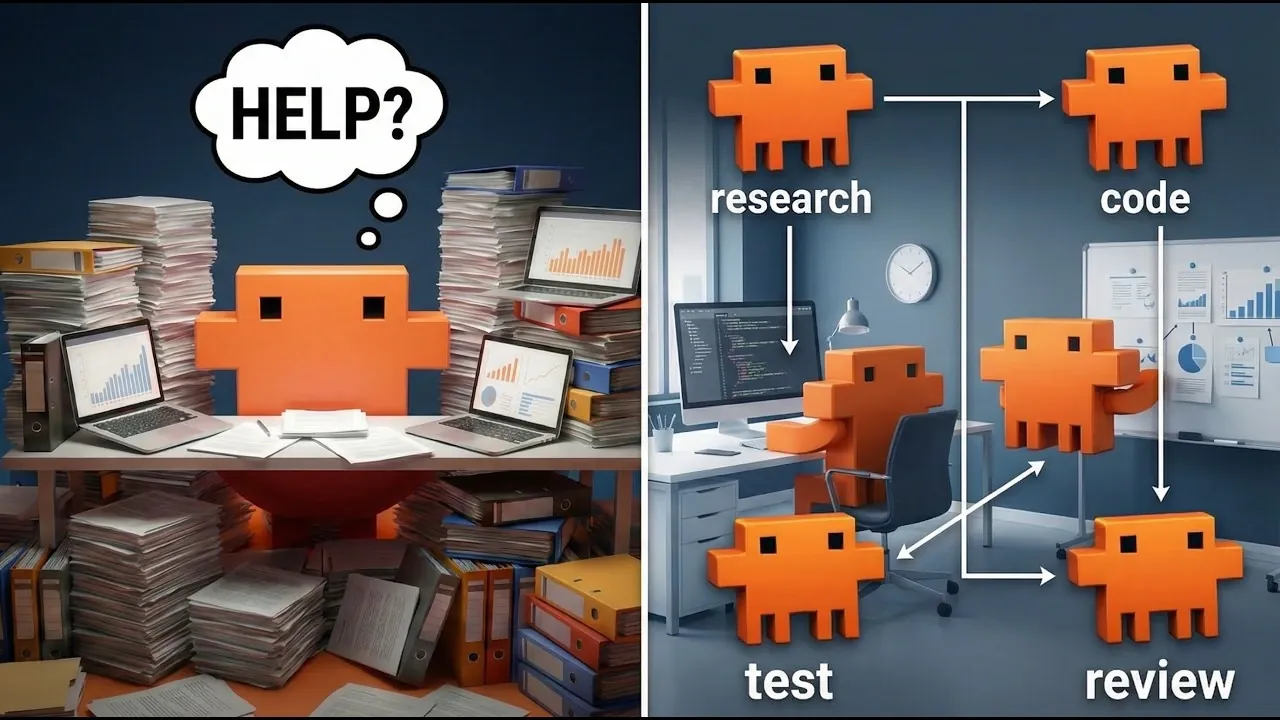
Claude Code agent teams enable advanced collaboration by coordinating multiple agents to handle complex workflows efficiently. As outlined by Simon Scrapes, these teams address the limitations of single agents and sub-agents, such as restricted context windows and communication bottlenecks. By allowing direct cross-agent communication and parallel task execution, agent teams are particularly suited for tasks requiring high levels of coordination, like software development or content repurposing.
In this hands-on walkthrough, you’ll learn how to set up agent teams in Claude Code, including activating experimental features and defining task-specific prompts. The guide also explores scenarios where agent teams excel, such as managing interdependent workflows or maintaining consistency across diverse outputs. By understanding these practical applications and setup steps, you’ll be equipped to deploy agent teams effectively for collaborative projects.
Claude Code Agent Teams Overview
TL;DR Key Takeaways :
- Claude Code agent teams address the limitations of single agents and sub-agents by allowing enhanced coordination, parallel task execution, and direct cross-agent communication.
- Agent teams are particularly effective for tasks requiring high levels of collaboration, such as software development or content repurposing, by using specialized agents for different roles.
- Setting up agent teams involves allowing experimental features, updating the Claude Code instance, and tailoring task definitions to specific requirements.
- Key benefits of agent teams include faster task completion through parallel execution, seamless cross-agent communication, and task-specific precision, but they also come with challenges like higher token usage and potential file conflicts.
- Strategic deployment involves choosing between single agents, sub-agents, or agent teams based on task complexity and collaboration needs, making sure optimal resource utilization and workflow efficiency.
Understanding the Limitations of Single Agents
Single agents are designed to handle tasks independently, but their capabilities are often constrained by their limited context window. This window restricts the amount of information they can process at any given time. As the context window fills, critical details may be compressed or lost, leading to errors and inefficiencies. For tasks requiring long-term memory, intricate coordination, or handling large volumes of data, single agents can quickly become inadequate.
For example, when managing a project with multiple interdependent components, a single agent may struggle to maintain consistency across tasks. This limitation highlights the need for more advanced systems capable of handling complex workflows.
How Sub-Agents Enhance Efficiency
Sub-agents improve upon single agents by specializing in specific tasks. This specialization allows for higher-quality outputs and enables parallel task execution, reducing both time and computational costs. However, sub-agents typically communicate only with the main agent, creating bottlenecks in workflows that require extensive interaction between multiple agents.
For instance, in a scenario where sub-agents are tasked with writing, editing, and formatting a document, the lack of direct communication between them can slow down the process. This limitation becomes particularly evident in environments requiring high levels of collaboration, where seamless interaction is essential for success.
How to Use Claude Code Agent Teams With Opus 4.6
Here is a selection of other guides from our extensive library of content you may find of interest on Claude Code Agents.
- Claude Code Update: LSP Support, Sub-Agents, and Ultrathink
- Claude Code Agent Teams Workflows for Large Projects in 2026
- Boost Code Efficiency with Claude Code’s New AI Sub-Agents
- Plan, Code, and Review in Parallel with Agents in Claude Code
- Agent Teams Turns Claude Code into a Fast Multi-Worker System
- Agent Browser Lets Claude Code Control Chromium for Automations
- New Claude Code 2.0 Agentic AI Coding Agent
- Claude Code’s Sub-Agents – AI
- Claude Code 2.1 Custom Output Modes for Beginners & Pros
- 36 Claude Code Tips for Smarter, Faster AI Coding Workflows
The Unique Advantages of Agent Teams
Agent teams are designed to overcome the constraints of both single agents and sub-agents. These teams consist of multiple Claude Code instances, each with its own independent context window. By sharing a centralized task list and allowing direct communication between agents, they assist smooth collaboration and efficient task execution.
This makes agent teams particularly effective for tasks requiring high levels of coordination. For example, in software development, agent teams can include specialized agents for API development, frontend design, and testing, all working together to ensure a cohesive final product. Similarly, in content repurposing, agent teams can maintain consistency across various formats, such as blog posts, newsletters, and social media content.
Steps to Set Up Agent Teams
Setting up agent teams is a straightforward process that ensures your system is ready for collaborative workflows:
- Open the `settings.json` file and activate the experimental feature for agent teams.
- Verify that your Claude Code instance is updated to the latest version.
- Restart the system to apply the changes.
- Define tasks and specify the need for an agent team through prompts, tailoring the setup to your specific requirements.
By following these steps, you can configure your system to handle complex, collaborative tasks efficiently.
Optimal Scenarios for Using Agent Teams
Agent teams are most effective when tasks require varying levels of collaboration. Below are examples of how they can be applied based on the degree of collaboration needed:
- Low Collaboration (2/10): Tasks such as creating separate LinkedIn and Instagram posts, where minimal interaction between agents is required.
- Moderate Collaboration (6/10): Content repurposing, such as making sure consistency across blog posts, newsletters, and social media carousels.
- High Collaboration (8/10): Complex projects like SaaS application development, where agents (e.g., API developer, frontend developer, tester) must work closely together.
By aligning the level of collaboration with the task requirements, you can maximize both efficiency and output quality.
Key Benefits of Agent Teams
Agent teams offer several distinct advantages that make them ideal for managing intricate workflows:
- Parallel Task Execution: Multiple agents can work simultaneously, significantly reducing completion times.
- Direct Cross-Agent Communication: Agents can interact seamlessly, making sure consistency and coordination across outputs.
- Task-Specific Inputs: Individual agents can be engaged for specialized tasks, providing flexibility and precision.
These features make agent teams a powerful tool for tackling complex, collaborative projects.
Challenges and Considerations
While agent teams offer numerous benefits, they also come with certain challenges that must be addressed for optimal performance:
- Higher Token Usage: Managing multiple agents and shared contexts can increase computational costs.
- Limited Context Inheritance: Memory transfer between the main workflow and teammates may be restricted, requiring careful planning.
- File Overwrite Risks: Without proper file separation strategies, there is a potential for data conflicts during collaboration.
Understanding these challenges is essential for effective planning and resource management, making sure that the benefits of agent teams outweigh their limitations.
Best Practices for Effective Deployment
To maximize the potential of Claude Code agent teams, consider the following best practices:
- Use Single Agents: Deploy single agents for straightforward tasks with minimal context requirements.
- Use Sub-Agents: Use sub-agents for specialized tasks or when the context size exceeds a single agent’s capacity.
- Deploy Agent Teams: Opt for agent teams only for tasks that demand extensive collaboration and parallel execution.
By aligning your choice of agents with the complexity and collaboration needs of your tasks, you can optimize performance and resource utilization.
Strategic Decision-Making for Multi-Agent Systems
When deciding between single agents, sub-agents, or agent teams, it is crucial to assess the complexity of the task and the level of collaboration required. Properly managing permissions, context, and file separation is essential to avoid inefficiencies and ensure smooth workflows. By understanding the strengths and limitations of each option, you can make informed decisions that align with your objectives and maximize productivity.
Media Credit: Simon Scrapes | AI Automation
Disclosure: Some of our articles include affiliate links. If you buy something through one of these links, Geeky Gadgets may earn an affiliate commission. Learn about our Disclosure Policy.
