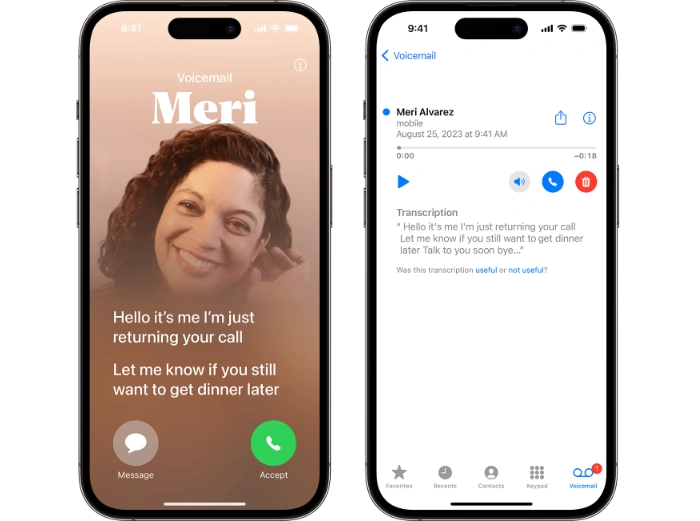
Live Voicemail is a new feature in iOS 17 that allows you to see a live transcript of a voicemail message as the caller is leaving it. This can be helpful if you can’t answer the call right away, or if you want to see what the caller is saying before you decide to pick up.
To use Live Voicemail, you first need to enable it in your iPhone’s settings. To do this:
Open the Settings app.
Tap Phone.
Tap Live Voicemail.
Toggle the Live Voicemail switch to the On position.
Once Live Voicemail is enabled, you can start using it to transcribe your voicemail messages. To do this, simply follow these steps:
When you receive an incoming call, tap the Voicemail button to send the call to voicemail.
If you don’t answer a call, it will automatically be sent to voicemail.
To listen to a voicemail message, open the Phone app and tap the Voicemail tab.
Tap the voicemail message you want to listen to.
As the caller is leaving the message, you will see a live transcript of the message on the screen.
If you want to pick up the call while the caller is leaving a voicemail message, simply tap the Answer button.
Additional features of Live Voicemail
In addition to transcribing voicemail messages, Live Voicemail also has a few other features that can be helpful. For example, you can:
Pause and resume playback of a voicemail message. To do this, simply tap the Pause button and then the Play button.
Skip forward or backward in a voicemail message. To do this, tap the Skip Forward or Skip Backward buttons.
Mark a voicemail message as unread. To do this, tap the Mark as Unread button.
Delete a voicemail message. To do this, tap the Delete button.
Tips for using Live Voicemail
Make sure that your iPhone is connected to the internet. Live Voicemail requires an internet connection to work.
If you are using Live Voicemail with a hearing aid or other assistive listening device, make sure that the device is compatible with Live Voicemail.
If you are having trouble using Live Voicemail, try restarting your iPhone.
Troubleshooting Live Voicemail
If you are having trouble using Live Voicemail, here are a few things you can try:
Check to make sure that Live Voicemail is enabled in your iPhone’s settings.
Make sure that your iPhone is connected to the internet.
If you are using Live Voicemail with a hearing aid or other assistive listening device, make sure that the device is compatible with Live Voicemail.
Restart your iPhone.
If you are still having trouble, contact Apple Support for assistance.
Summary
Live Voicemail is a new feature in iOS 17 that can be helpful for people who receive a lot of voicemail messages. By transcribing voicemail messages as the caller is leaving them, Live Voicemail can help you to save time and to avoid listening to unnecessary messages.
Here are examples of when Live Voicemail could be useful:
- You are in a meeting or otherwise unable to answer a call. Live Voicemail can help you to see what the caller is saying before you decide to pick up.
- You are receiving a lot of voicemail messages from different people. Live Voicemail can help you to quickly scan through the messages and to identify the ones that are important.
- You have difficulty hearing or understanding voicemail messages. Live Voicemail can help you to read the messages on the screen, which can make them easier to understand.
- You want to avoid listening to unnecessary voicemail messages. Live Voicemail can help you to identify the important messages so that you can skip the ones that are not important.
Overall, Live Voicemail is a useful feature that can make your life easier. If you receive a lot of voicemail messages, we hope that you find our guide on how to set up and use Liove Voicemail in iOS 17 helpful, if you have any tips, questions or comments, please let us know in the comments below. You can find out more details about this feature at the link below.
Source & Image Credit: Apple
Disclosure: Some of our articles include affiliate links. If you buy something through one of these links, Geeky Gadgets may earn an affiliate commission. Learn about our Disclosure Policy.
