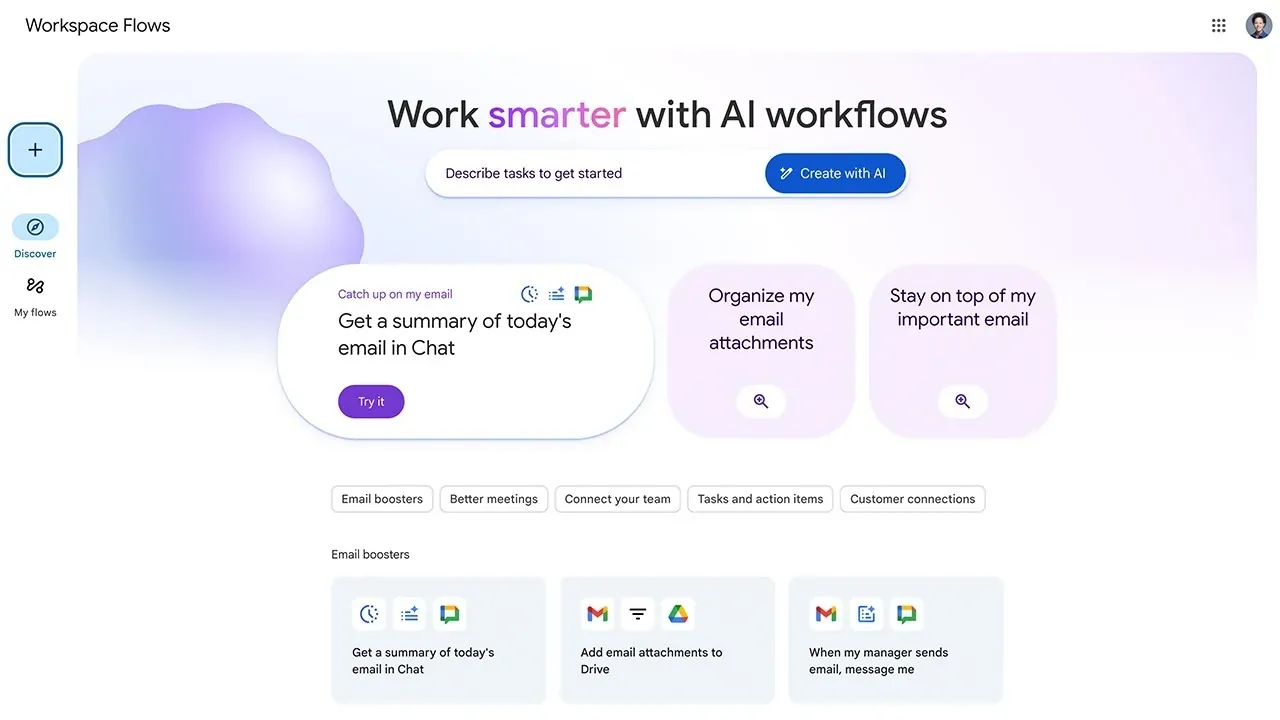
What if you could eliminate the most tedious parts of your workday, those repetitive tasks that drain your focus and eat up your time? Imagine your inbox automatically sorting itself, meeting agendas preparing themselves, and notifications arriving only when they truly matter. Bold claim? Not anymore. With Google Workspace Flows, an AI-powered tool designed for seamless automation, this level of efficiency is no longer a distant dream. Whether you’re overwhelmed by email clutter or bogged down by routine workflows, this tool offers a way to reclaim your time and focus on what matters most.
In this tutorial by the Google Workspace Developers team, you’ll discover how Google Workspace Flows can transform the way you work. From understanding its core components—like triggers, actions, and variables, to exploring pre-built templates that simplify setup, this guide will show you how to unlock its full potential. You’ll also learn how AI integrations and third-party app connections make it possible to create workflows that are not just automated but also intelligent and adaptable. By the end, you’ll see how this tool isn’t just about saving time, it’s about redefining how you approach productivity. So, what could your day look like if the mundane tasks took care of themselves? Let’s explore.
Google Workspace Flows Overview
TL;DR Key Takeaways :
- Google Workspace Flows is an AI-powered tool designed to automate repetitive tasks across Google Workspace apps and third-party platforms, enhancing productivity and simplifying workflows.
- The tool operates using three core components: starters (triggers), steps (actions), and variables (data transfer), allowing seamless and customizable automation.
- Users can create workflows using a drag-and-drop interface, pre-built templates, or custom designs, tailoring automation to specific needs like email management or meeting preparation.
- Integration with AI tools like Gemini and third-party apps allows for advanced capabilities such as intelligent summarization and cross-platform automation.
- Testing and validation features, including real-time testing and activity monitoring, ensure workflows function reliably and deliver consistent results.
Understanding the Core Components
To effectively use Google Workspace Flows, it is essential to understand its three key components. These elements form the foundation of every workflow and ensure seamless automation:
- Starters: These are the triggers that initiate a flow. Common examples include receiving an email, a calendar event, or reaching a specific time of day.
- Steps: Steps define the actions your flow performs, such as sending an email reply, updating a spreadsheet, or summarizing a document.
- Variables: Variables allow data to pass between steps. For instance, you can extract an email address in one step and use it to send a notification in another.
These components work in harmony to reduce manual effort, making sure tasks are completed efficiently and accurately. By understanding and using these elements, you can design workflows that align with your specific goals.
How to Create and Customize Flows
Building a flow in Google Workspace is straightforward, thanks to its user-friendly interface. The process involves a few key steps that allow you to tailor workflows to your needs:
- Define Your Goal: Clearly identify the task you want to automate and the conditions that will trigger the flow.
- Add and Organize Steps: Use the drag-and-drop interface to add, reorder, or modify steps to suit your specific requirements.
- Use Templates: For a quick start, select a pre-built template from the Discover section and customize it as needed.
For example, you can automate email triage by setting up a flow that categorizes incoming messages based on keywords or sender information. This allows you to focus on high-priority emails without manually sorting through your inbox. By customizing each step, you can ensure the flow aligns perfectly with your workflow.
Get started with Google Workspace Flows

Take a look at other insightful guides from our broad collection that might capture your interest in Google Workspace.
- Google Workspace Gemini Flows : Makes Creating AI Agents Easy
- Master Google Workspace – Beginners Guide
- Google Workspace AI: Tips for Effective Prompt Engineering
- Microsoft 365 vs Google Workspace which is best for you?
- How to Use Google Workspace: A Complete 2025 Guide & Hacks
- Google Gemini AI : Seamless Integration with Google Workspace
- How to use Google Gemini With Workspace
- 3 Essential Tips for Using Gemini in Google Workspace
- Google Workspace now features Gemini AI assistant
- How to Use Google Tasks for Seamless Task Management
Templates: A Quick Start to Automation
Google Workspace Flows provides a variety of pre-built templates to help you get started quickly. These templates are designed for common tasks and can be fully customized to fit your specific needs. Some examples include:
- Automatically responding to emails based on predefined criteria.
- Summarizing lengthy email threads for quick review.
- Sending notifications when specific events occur, such as file updates or calendar changes.
Each template serves as a foundation that you can adapt by modifying starters, steps, and variables. This flexibility ensures that even complex workflows can be implemented with minimal effort, saving time and improving efficiency.
Enhancing Workflows with AI and Third-Party Integrations
One of the standout features of Google Workspace Flows is its integration with AI tools like Gemini. These tools bring advanced capabilities to your workflows, such as intelligent summarization, research, and decision-making. For example, Gemini can analyze lengthy documents and provide concise summaries, allowing you to process information faster.
Additionally, Google Workspace Flows supports third-party app integrations, allowing you to connect your workflows to external tools and services. This capability ensures that your automation can operate seamlessly across multiple platforms, whether you are managing customer interactions, tracking project updates, or coordinating team efforts. By combining AI and third-party integrations, you can create workflows that are both intelligent and versatile.
Testing and Validating Your Flows
Before activating a flow, it is crucial to test and validate it to ensure it functions as intended. Google Workspace Flows includes robust tools to help you refine your workflows:
- Real-Time Testing: Trigger events to observe how your flow performs in real time and identify any potential issues.
- Activity Monitoring: Use the Activity panel to review the flow’s performance and track its execution history.
- Adjustments: Make necessary changes to improve accuracy, reliability, and overall functionality.
This iterative process helps you avoid errors and ensures that your automation runs smoothly. By thoroughly testing your flows, you can trust that they will deliver consistent results and save time in the long run.
Practical Use Cases for Google Workspace Flows
Google Workspace Flows is a versatile tool that can be applied to a wide range of tasks, making it an invaluable asset for both individuals and teams. Here are some practical examples:
- Meeting Preparation: Automate agenda creation, send reminders, and summarize key points from previous meetings to streamline preparation.
- Email Management: Categorize, prioritize, and respond to emails automatically, reducing inbox clutter and improving response times.
- File and Folder Tracking: Receive notifications when changes are made to shared files or folders, keeping you informed about collaborative projects.
These use cases highlight the potential of Google Workspace Flows to simplify complex processes and free up time for more strategic activities. By automating routine tasks, you can focus on higher-value work and achieve greater productivity.
Maximizing the Potential of Google Workspace Flows
Google Workspace Flows is a powerful tool for automating repetitive tasks and optimizing workflows across Google Workspace apps and third-party platforms. By using its core components, starters, steps, and variables, you can create highly customized flows tailored to your needs. Whether you use pre-built templates or design workflows from scratch, the integration of AI tools and external apps ensures your automation is both intelligent and flexible. With features like testing, validation, and real-time monitoring, you can trust that your workflows will perform reliably, helping you save time and enhance productivity.
Media Credit: Google Workspace Developers
Disclosure: Some of our articles include affiliate links. If you buy something through one of these links, Geeky Gadgets may earn an affiliate commission. Learn about our Disclosure Policy.
