Is your iPhone storage full, and you need to free up space? You may have already tried to estimate how long it would take to clean everything manually and realized it’s too much. So using an iPhone cleaner app sounds like the easier option. But when you open the App Store, you see dozens of them, all claiming to be the best.
That’s exactly why we put this guide together. We selected several of the best iPhone storage cleaner apps, tested them under the same conditions, and broke down what they actually do. You’ll see their core features, limitations, and just as important, their pricing. That way, you won’t start cleaning your iPhone only to hit a paywall halfway through the process. Curious which ones are worth your time? Let’s get into it.
iPhone cleaner apps have limited access to your data by design. In practice, they can help you clean photos and videos, manage contacts, and sometimes review calendar or email data. But apps, caches, and system storage are not accessible to third-party cleaners. If an app claims it can fully clean those areas, that claim is misleading. It’s better to set the right expectations before using any of the tools below.
Best Tools to Clean iPhone Storage
TL;DR Key Takeaways:
- Clever Cleaner is the best free iPhone cleaner that focuses on fast photo and video cleanup without ads or paywalls.
- Easy Cleaner works as a contact-focused tool that finds, merges, and fixes contact data completely free.
- AI Cleaner provides one-tap full cleanup across multiple categories using smart AI analysis, but requires a subscription for full access.
- Cleaner Kit is a feature-rich cleaner that handles photos, videos, contacts, email, and more in one place.
- Boost Cleaner offers structured cleanup with filters, compression tools, and extra features like a private vault and utilities.
1. Clever Cleaner: AI CleanUp App
Rating (App Store): 4.8 / 5 (61K ratings)
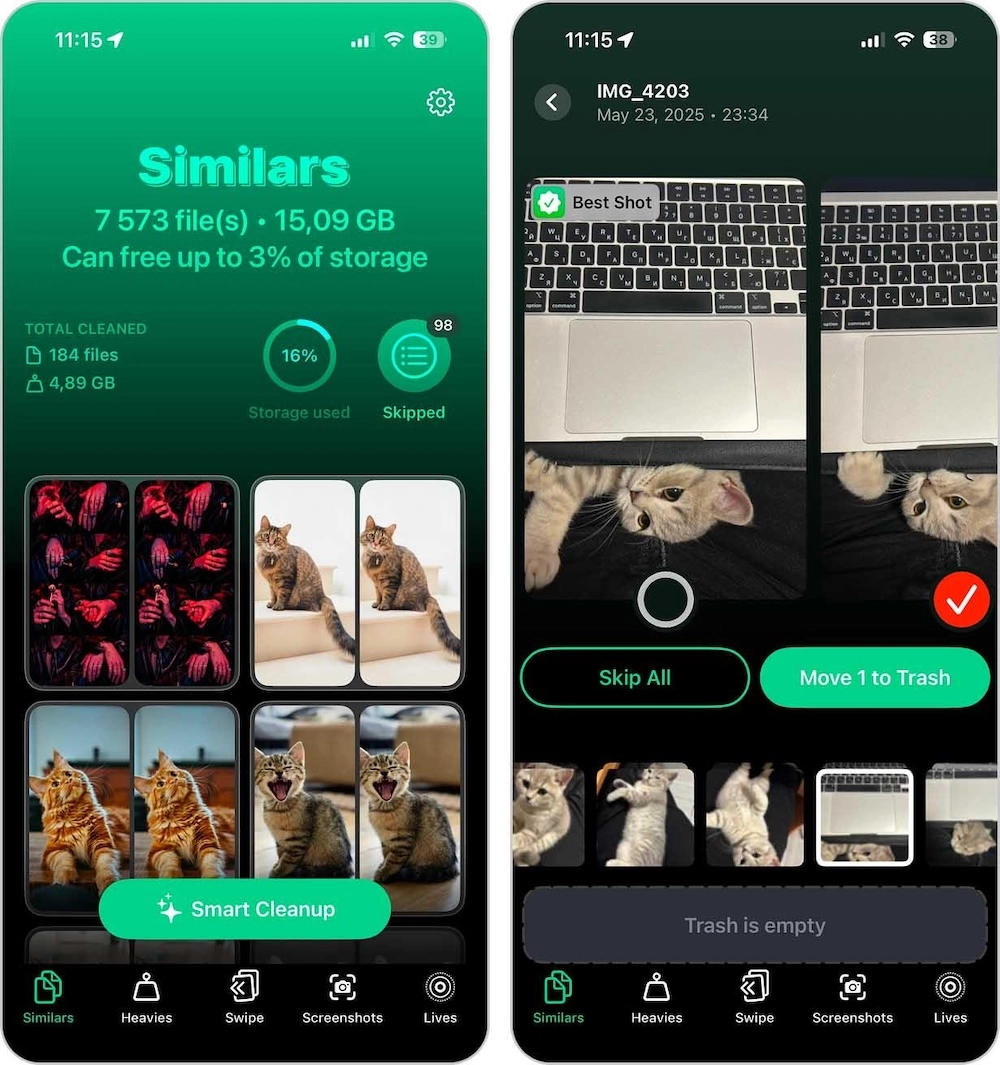
Clever Cleaner is a relatively new app in the iPhone storage cleaner category, but it already has a large user base. At first glance, its main focus is helping you find and remove duplicate and similar-looking photos, using AI to select the best shot, something the built-in iOS duplicate utility doesn’t do. At the same time, the app helps you find large videos and either delete or compress them, quickly remove screenshots, and convert Live Photos into still images. For those who want more control, there’s a swipe mode where photos are grouped by month, and you decide what to keep or delete with simple gestures. Most importantly, all features are available for free, with no paywalls or ads, which sets it apart from other cleaners.
Notable features:
- Smart cleanup for duplicate and similar photos in one tap
- AI algorithms that select the best photo in each group
- Detects and removes large videos from your library
- Video compression with adjustable quality levels
- Converts Live Photos into still images
- Built-in screenshot cleaner for quick removal
- Swipe-based mode for manual photo sorting
- Built-in trash to review files before deletion
- Displays storage usage by category and potential space savings
- No ads, subscriptions, or hidden fees
Price: Completely free (and will remain free for early users)
Cons:
- Cleanup is currently limited to Photos app content only
2. Easy Cleaner.
Rating (App Store): 4.8 / 5 (29K ratings)
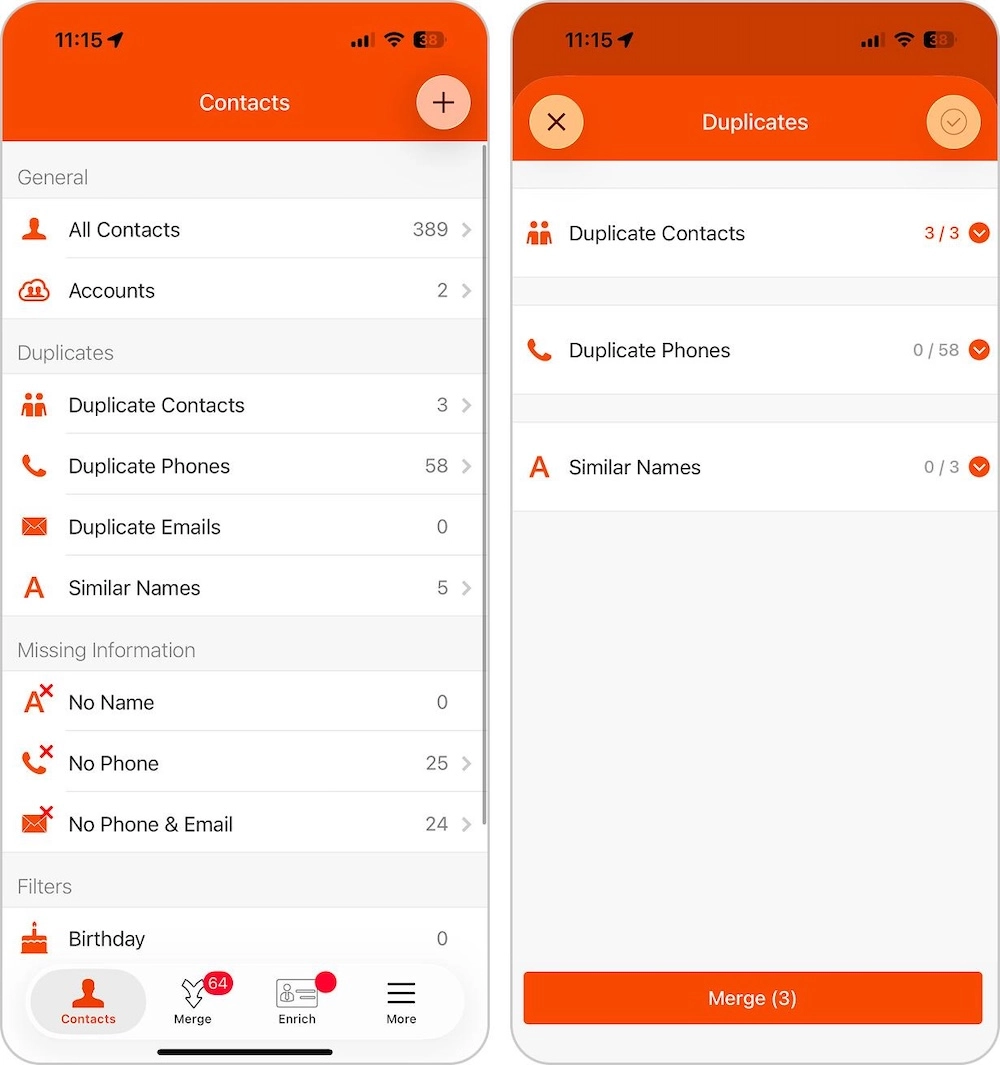
Easy Cleaner. It is the best iPhone cleaner if your main storage issue comes from an unorganized contacts list rather than photos or videos. The app works as an advanced contact management tool and helps find duplicate contacts based on phone numbers, emails, or matching names, then merge them into a single entry. It also detects contacts with missing information, such as no name, phone number, or email, and lets you complete these fields. All changes apply instantly to your contact list, which makes cleanup straightforward and controlled. In addition, the app allows you to create a full backup of your contacts and restore them if needed. All of these features are available completely free, with no restrictions.
Notable features:
- Detects duplicate contacts
- Merges similar entries into single records
- Finds contacts with missing names, numbers, or emails
- Uses smart filters for companies, job titles, and dates
- Creates restore points before cleanup
- Supports multiple languages
Price: Completely free (no subscriptions or in-app purchases)
Cons:
- Limited strictly to contacts
- The interface is simple but slightly outdated
- No storage impact preview or space-freed estimation
3. AI Cleaner: Clean Up Storage
Rating (App Store): 4.6 / 5 (188K ratings)
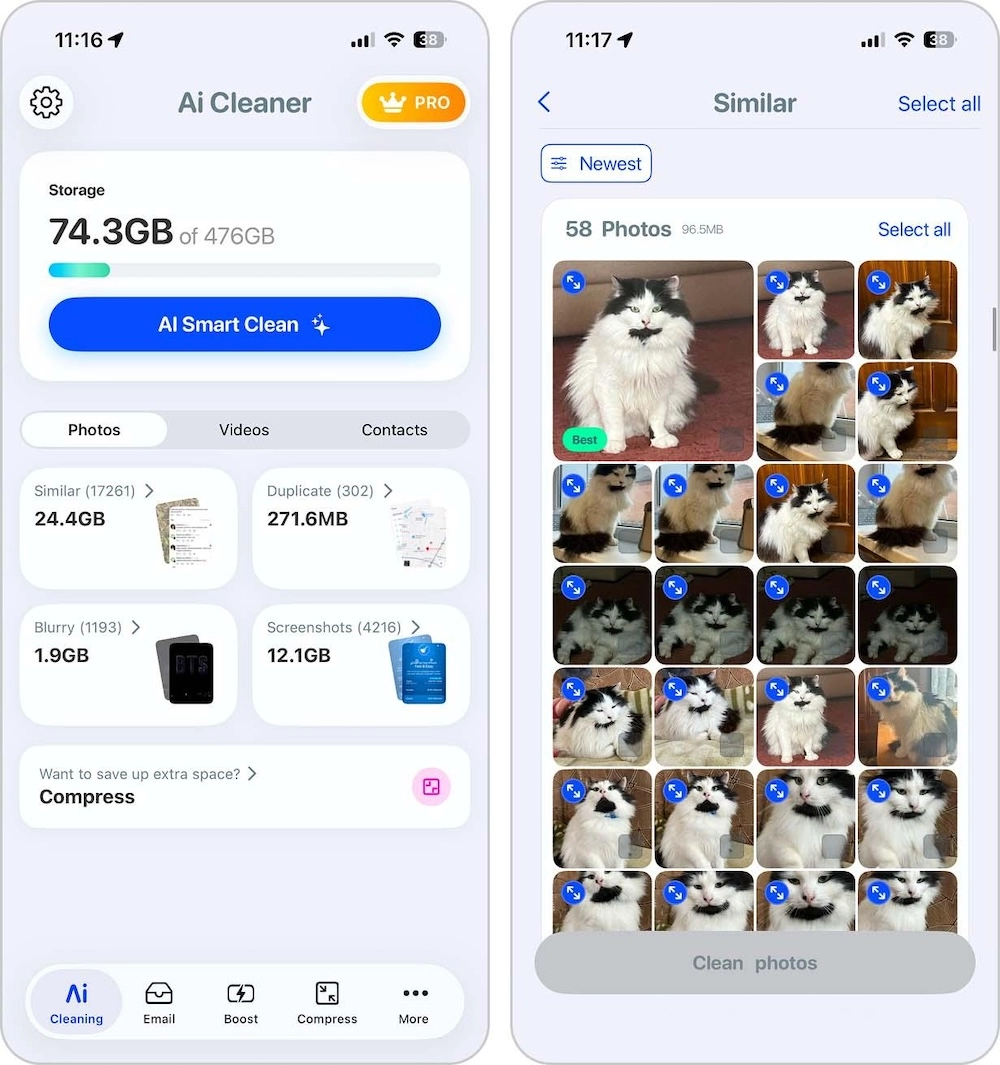
AI Cleaner is a solid iPhone cleaner app if you want to run a full cleanup across multiple areas. It offers a smart AI cleaning feature that scans your entire iPhone storage, identifies removable items across photos, videos, contacts, and events, and lets you clear them in one tap. If a full cleanup in one go doesn’t suit you, the app also allows you to clean each category separately. It also includes email cleanup and built-in tools to compress both photos and videos.
Notable features:
- AI smart cleanup for one-tap full cleaning
- Photo cleanup for similar images, duplicates, blurry photos, and screenshots
- Video cleanup for duplicates, short clips, and screen recordings
- Contact cleanup for duplicates and incomplete entries
- Email cleanup for removing unnecessary messages
- Calendar cleanup for outdated events
- Photo and video compression tools
Price: Free to download with in-app purchases, with a weekly plan available for $12 and a 3-day trial period
Cons:
- Scans take longer than expected
- Higher price compared to similar apps
4. Cleaner Kit – Clean Up Storage
Rating (App Store): 4.4 / 5 (336K ratings)
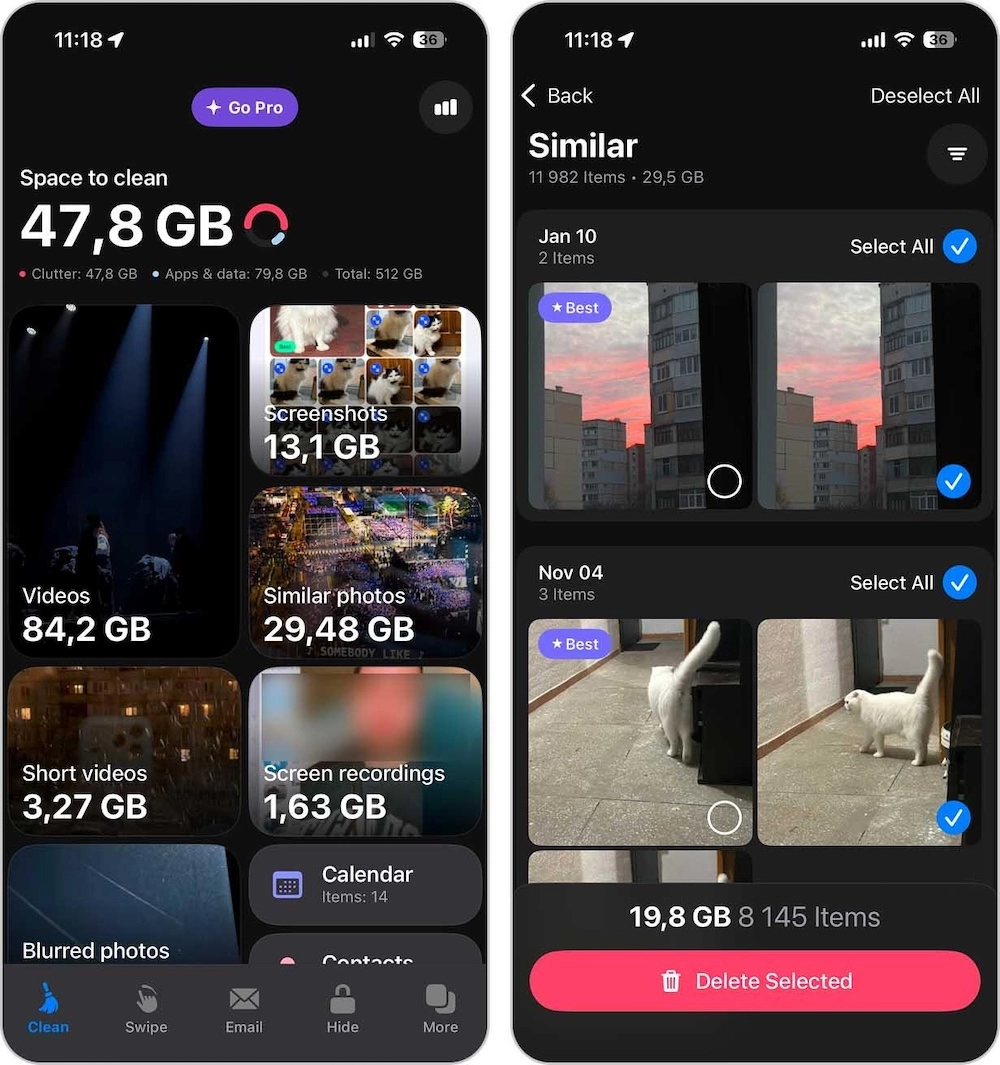
Cleaner Kit has been on the iPhone storage cleaner market for a while and has established itself as a full-featured solution. It helps detect and remove duplicate and similar photos (separated into different categories), as well as large and similar videos, screenshots, and blurry images. The app also includes cleanup tools for contacts, calendar entries, and email data. In addition to cleanup features, it offers a Secret Space for storing photos, videos, and contacts, along with extra tools like charging animations, internet speed tests, and tips for cleaning storage in areas the app itself can’t access.
Notable features:
- Detects duplicate photos and videos
- Swipe mode with sorting by date and categories
- Built-in video compressor for large files
- Merges and organizes contacts
- Cleans up old calendar events
- Email cleanup tool for removing unnecessary messages
- Customizable widgets for storage monitoring
Price: Free to download with limited functionality and optional in-app purchases available at $6.99 per week or $22.99 per year with a trial period
Cons:
- Core cleanup actions require payment
- The interface feels crowded
5. Boost Cleaner – Clean Up Smart
Rating (App Store): 4.5 / 5 (67K ratings)
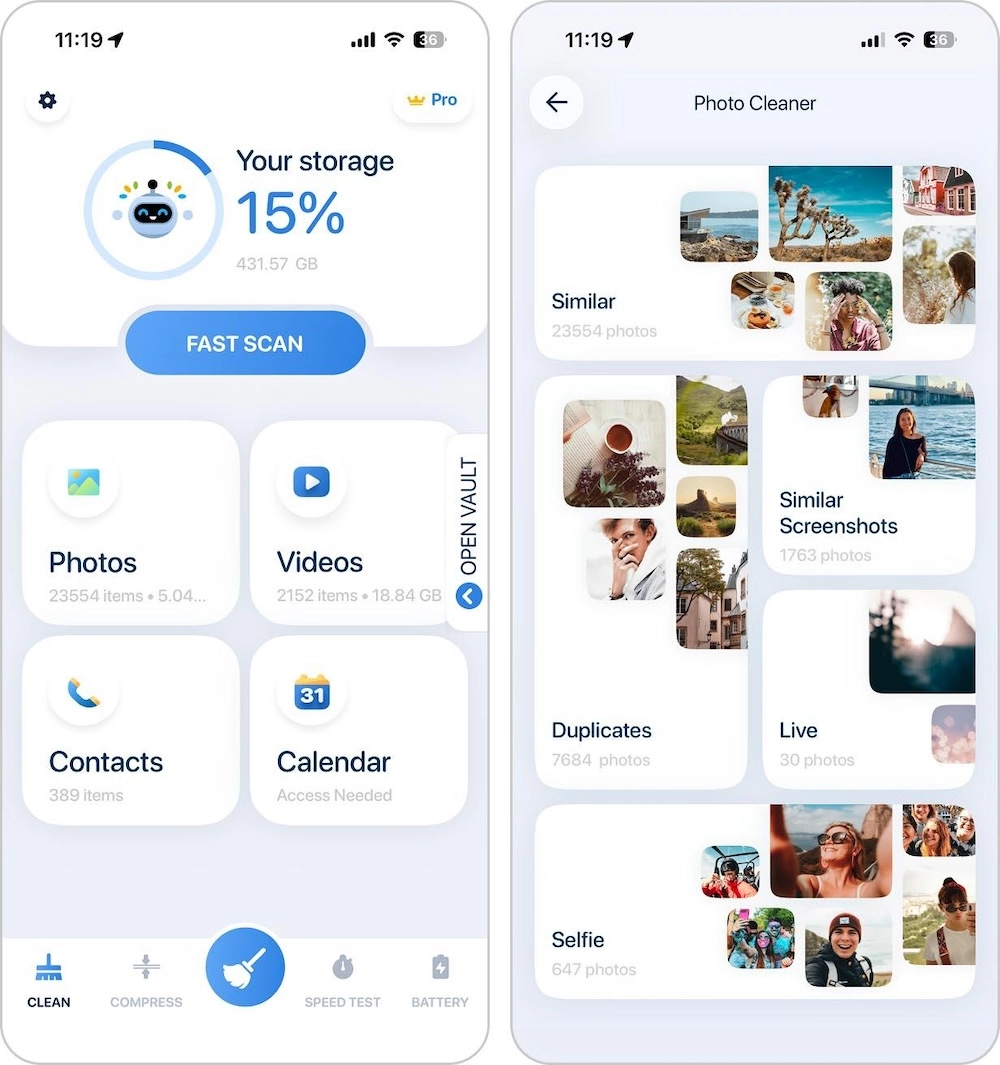
Boost Cleaner – Clean Up Smart is a good option for users who want a more structured approach to iPhone storage cleanup. The app scans your library and groups clutter into clear categories, including duplicate and similar photos, large videos, contacts, and calendar events that need attention. It also allows you to filter photos by date and location, which makes it easier to narrow down what to remove without scrolling through your entire library. In addition to cleanup tools, the app includes photo and video compression, an internet speed test, and charging animations.
Notable features:
- Photo cleanup for duplicates, similar images, screenshots, Live Photos, and selfies
- Video cleanup for similar clips and large files
- Manager for duplicate and incomplete contacts
- Calendar cleanup for past events
- Photo and video compression tools
- Private vault for photos, videos, and contacts
Price: Free to download with in-app purchases, including $6.99 per week, $14.99 per month, and $49.99 per year
Cons:
- All features require a subscription to use
- Each time you open the video cleanup tool, you have to wait for a full scan to complete
Conclusion
So, instead of scrolling through dozens of apps in the App Store, you now have five best iPhone storage cleaner options to choose from, depending on your needs and budget.
If we sum it up, Clever Cleaner is the top choice. It offers a full set of tools for cleaning up your photo and video library, usually the most cluttered part of iPhone storage, and does it completely free. If you’re looking for a more all-in-one cleanup across multiple categories, AI Cleaner is a good option, but full access requires a subscription.
In general, any iPhone storage cleaner can help you free up a few gigabytes when you need a quick cleanup. However, storage management is not a one-time task and it works best when you check large categories from time to time and keep them under control. This habit helps your iPhone run smoothly and avoids unnecessary strain on storage and battery.
Disclosure: Some of our articles include affiliate links. If you buy something through one of these links, Geeky Gadgets may earn an affiliate commission. Learn about our Disclosure Policy.
